| Getting your Trinity Audio player ready... |
Highlights
- n8n empowers both technical and non-technical teams to automate workflows, integrate apps, and streamline processes without heavy costs or steep learning curves.
- With open-source freedom, self-hosting options, and over 400 integrations, n8n adapts to any business size, workflow complexity, or industry need.
- By reducing manual tasks, minimizing errors, and enabling smarter workflows, n8n helps businesses save time, improve data accuracy, and focus on growth-driven work.
Introduction
Every business runs on data, apps, and countless digital tools, but here’s the problem: they rarely work together. Sales updates sit in one system, marketing campaigns live in another, and finance reports are buried in spreadsheets.
The result?
You waste your valuable time on manual tasks, and you make decisions with fragmented information.
But n8n changes that! It’s not just another automation tool; it connects your digital workflow, be it connecting apps, orchestrating data, and making processes run smarter, faster, and intuitively.
Did you know that the platform offers over 400 pre-configured integrations, enabling users to automate workflows across a wide range of applications and services.
But it’s not just about automation. It’s about creating smarter processes, reducing operational friction, and giving your team the freedom to focus on strategic work that drives growth.
Let’s keep reading to learn more about what n8n is, how it works, its benefits, and use cases.
What is n8n?
n8n was founded in 2019 by Jan Oberhauser with the vision of creating a fair-code, open-source alternative to traditional automation platforms. The goal was simple: empower users to integrate, automate, and simplify without being locked into proprietary ecosystems while maintaining full control over their data.
“We are still seen as a technical product and less of one for citizen-developers. We plan to make n8n simpler to use, so that it’s much easier to adopt. We want to give everyone technical superpowers, whether it’s the marketing team or the IT department.”
Since it’s open-source, you can customize it to fit your exact needs instead of working around tool limitations. Additionally, with hundreds of integrations, a visual workflow builder, and the option to add code when needed, n8n adapts to your business, not the other way around.
All in all, it’s a smarter, more scalable way to reduce manual work, cut friction, and focus on what really drives results.
How Does n8n Work?
n8n works by connecting different apps and services through automated workflows, and it’s known as nodes. Each node represents an action, like sending an email, updating a spreadsheet, or posting to Slack.
You can link these nodes together visually using a simple drag-and-drop interface, creating a chain of actions that run automatically whenever certain conditions are met.
For example, imagine your sales team gets a new lead through a web form. With n8n, you can create a workflow that instantly adds that lead to your CRM, sends a welcome email through Gmail, and notifies your sales rep on Slack, all without anyone touching a button.
Once you set it up, n8n handles everything in the background, saving your team hours of manual work and ensuring nothing falls through the cracks.
In short, n8n works like a smart connector that brings all your tools together, automates repetitive tasks, and keeps your business running smoothly without human intervention.
Also Read: Do Websites Go Away with AI Agents
Key Features of n8n to Know
When it comes to automation, the difference between “good enough” and “game-changing” lies in the features behind the platform. n8n stands out because it’s built for people who want more control, smarter workflows, and flexibility without limits.
So, before you dive into building workflows, it’s worth exploring what makes this tool so adaptable and why those features matter for modern businesses aiming to scale efficiently.
➢ Open Source: One of the biggest strengths of n8n is that it’s open-source. That means you have complete visibility and control over how it works and the freedom to customize it to your business needs. You’re not tied to a proprietary system or limited by paywalls; you can modify, extend, and build on top of n8n as your processes evolve.
➢ Self-Hosted & Cloud Options: n8n gives you the flexibility to choose how you run it. You can host it on your own servers to keep full control over your data and security, or use the n8n Cloud for a fully managed experience with automatic updates and maintenance. Either way, it adapts to your business’s infrastructure and compliance needs.
➢ Over 400+ Integrations: With more than 400 ready-to-use integrations, n8n connects seamlessly with popular apps like Slack, Google Sheets, Notion, HubSpot, and many more. With this, you can sync data, trigger notifications, or automate marketing tasks to easily link tools across your tech stack without writing complex code.
➢ Conditional Logic: n8n goes beyond basic automation by letting you add conditions and rules to your workflows. You can set “if this, then that” logic, like sending a different email based on a customer’s purchase history or routing support tickets to the right department automatically. This makes your automations smarter, more personalized, and better aligned.
➢ Database & Code Support: You can connect directly to databases like MySQL, PostgreSQL, or MongoDB to fetch, update, or analyze data as part of your workflows. And if you need more control, you can insert custom JavaScript code right inside your workflow to handle complex logic, making it ideal for users who want more than drag-and-drop automation.
➢ Loops & Data Transformations: Sometimes, automation needs to go beyond simple one-time actions. With n8n, you can loop through lists, process multiple records, or transform data on the fly before sending it to another app.
For instance, you could take a batch of new customer records, clean, format, and then push them to your CRM, all automatically. It’s like having a smart assistant that knows how to organize and process your data exactly how you want it.
➢ Custom Nodes: If you can’t find a built-in integration, n8n lets you create your own custom nodes. These act as personalized building blocks that perform unique actions specific to your workflow or internal tools.
Businesses use this feature to connect proprietary systems, internal APIs, or niche apps that aren’t covered by default integrations, making n8n endlessly adaptable.
➢ Scalability: As your business grows, so can your automations. n8n is built with scalability in mind, meaning it can handle everything from a few workflows to enterprise-level automation across teams and departments.
You can deploy it on your own infrastructure, expand resources as needed, and maintain consistent performance even when workflows get more complex.
Also Read: Best AI Tools for Web Developers You Should Know
What is n8n Used For?
The real power of n8n isn’t just in what it can do, it’s in how businesses use it. Whether it’s marketing, IT, data management, or customer support, teams across industries are finding smarter, faster, and more secure ways to get work done.
Understanding these use cases helps you see how n8n moves beyond theory and becomes a practical, day-to-day growth engine for your organization.
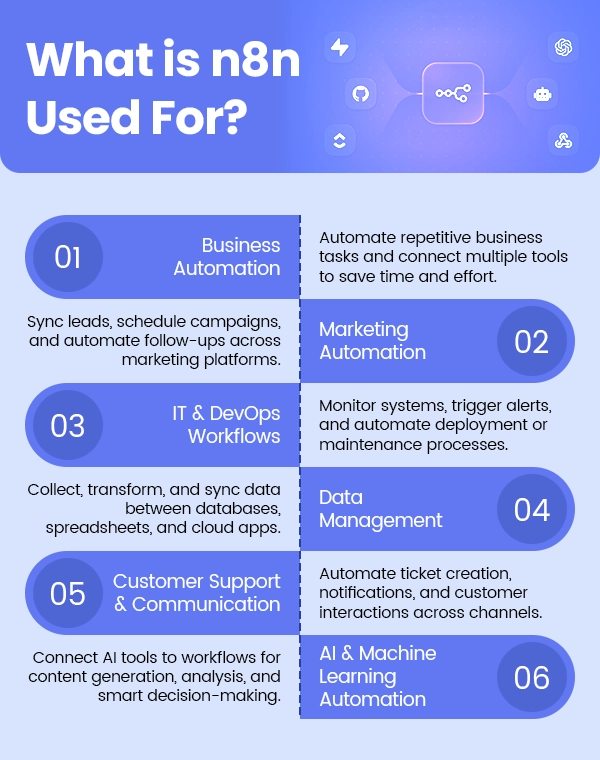
1. Business Automation
n8n helps businesses automate everyday operations by connecting tools and streamlining workflows. From approvals and task management to communication between departments, it eliminates repetitive manual work that slows teams down. The result is faster execution, fewer errors, and smoother collaboration across business functions.
Workflow automation has helped companies reduce human error; around 32% of firms experienced fewer errors after adopting automation.
Examples:
➔ Automatically create new tasks in Asana or ClickUp whenever a client submits a request form.
➔ Generate and send invoices through QuickBooks or Xero after a deal closes in the CRM.
➔ Notify the HR team on Slack when a new employee record is added to the system.
Also Read: Top Open-Source Automation Tools for Web Applications
2. Marketing Automation
For marketing teams, n8n acts as the ultimate connector between tools like HubSpot, Google Sheets, and Mailchimp. It simplifies campaign management, lead nurturing, and data tracking, all without juggling multiple platforms manually. With conditional logic and data mapping, marketers can build smarter, more personalized automations.
Examples:
➔ Sync new leads from Facebook Ads or Google Forms directly into your CRM.
➔ Trigger personalized email campaigns when a lead downloads a resource or signs up for a webinar.
➔ Update a Google Sheet automatically with campaign performance metrics from multiple ad platforms.
Also Read: Brand Strategy vs Marketing Strategy
3. IT & DevOps Workflows
n8n gives IT and DevOps teams a powerful way to automate infrastructure management, monitoring, and reporting. It can integrate with systems like AWS, GitHub, or Jira, helping tech teams respond faster and operate more efficiently. The ability to add custom code and database logic makes it especially useful for technical environments.
Examples:
➔ Automatically create a Jira ticket when an issue is reported on GitHub.
➔ Set up alerts on Slack when server performance drops below a defined threshold.
➔ Sync deployment logs or monitoring data between AWS CloudWatch and internal dashboards.
4. Data Management
Data is at the heart of every business, and n8n helps keep it accurate, consistent, and actionable. It can pull, clean, and move data between systems, ensuring that every team works with the same up-to-date information. Businesses use it to automate reporting, data migration, and integration between apps.
Examples:
➔ Automatically import daily sales data from an eCommerce platform into Google Sheets or a BI dashboard.
➔ Clean and format customer data before pushing it to your CRM.
➔ Consolidate data from multiple sources into one database for better analytics and insights.
5. Customer Support & Communication
Customer support teams often deal with a flood of messages, tickets, and status updates, and that’s where n8n really shines. It connects platforms like Zendesk, Intercom, Slack, and Gmail to streamline communication and ticket management. This means faster responses, fewer manual updates, and happier customers overall.
Examples:
➔ When a new support ticket is created in Zendesk, n8n can instantly notify your support team on Slack.
➔ Automatically send a follow-up email to customers once their issue is resolved.
➔ Create a daily report of open tickets and send it directly to the support manager’s inbox.
6. AI & Machine Learning Automation
n8n also makes it easy to implement AI workflow automation into your everyday operations, no heavy coding required. You can connect APIs from tools like OpenAI, Hugging Face, or Google Cloud to automate tasks that rely on intelligence or predictions. This helps businesses use AI for smarter decisions, faster processing, and more personalized experiences.
Examples:
➔ Automatically summarize long customer emails using OpenAI and send a short version to the support team.
➔ Use an AI model to classify customer feedback as positive, neutral, or negative, and route it accordingly.
➔ Feed data into a machine learning model to predict sales trends, then update your dashboard with the latest insights.
Also Read: Will AI Replace Web Developers
Excellent Benefits of Using n8n
n8n is a one-of-a-kind automation tool that empowers businesses to work smarter, not harder. Whether you’re a small startup or a large enterprise, understanding how n8n can streamline processes, protect your data, and scale with your business will change the way you think about productivity and efficiency.
Let’s find out more!
1. Cost-effective (open-source)
n8n enables businesses to automate complex workflows without spending a fortune on licensing fees or restrictive subscriptions. By using an open-source platform, teams get enterprise-grade automation capabilities while keeping overhead low.
This allows businesses to redirect resources toward growth initiatives, customer experience improvements, or expanding operational capacity.
2. Flexible for technical and non-technical users
With n8n, you’re not boxed into either only coders can use this or only business users. It bridges both: drag-and-drop workflows for non-technical users and code-level flexibility for developers.
Even the non-technical teams can leverage this tool to automate processes, speed up adoption, while reducing the dependency on one “tech gatekeeper” team. And when more people can build and maintain workflows, the organisation becomes more agile.
3. Data privacy through self-hosting
One of the big advantages is that you can self-host n8n. With n8n, you choose your infrastructure and keep custody of your data. That means you decide where the data lives, how it’s secured, and who can access what. For businesses with strict compliance or data-governance needs, this is a game-changer.
4. Community-driven support
Although a paid support plan might exist, the strength of n8n’s community is a major benefit. When you use open-source tools, you gain access to shared workflows, community-built integrations, forum help, and peer tips. That means if you run into a challenge, chances are someone else has been there and shared a solution.
This “community support” accelerates deployment, reduces cost, and ensures the tool stays innovative and aligned with real use-cases.
5. Highly customizable
Because n8n doesn’t force you into rigid templates, you can tailor automation workflows to your exact business logic. Whether it’s only do this if customer spent X > Y, or route this request to team Z if condition A, n8n adapts. And with hundreds of integrations (400+ at last count), you can plug into almost anything in your tech stack. This means your automation evolves alongside your business, rather than you having to bend your business processes to fit the tool.
6. Reduces manual workload and human error
This is really where you see the return on investment. When teams stop doing repetitive tasks manually, they spend more time on strategy, innovation, and client work.
According to recent workflow automation research, automation has improved productivity for 66% of knowledge workers.Also, workflow automation has been shown to reduce errors by 37% and boost data accuracy by 88%. With n8n in your stack, you’re not just doing more, you’re doing better, with fewer mistakes and more confidence in your data and processes.
Also Read: Can AI Really Develop an App?
n8n Integrations: What Apps Does It Work With?
n8n connects with hundreds of apps and services, making it a true automation hub for your business. Whether you’re managing teams, handling customer data, or processing files, n8n helps your tools work together seamlessly. Here’s a closer look at key integration categories:
It actually allows people to connect everything with anything. You can really build AI agents, build AI-powered applications, from developers to non-technical people, to do things that were only possible before for developers.
➢ Communication: n8n keeps your teams in sync by integrating with Slack, Discord, and Telegram. You can use n8n to automatically send notifications when a task is completed, alert your team about urgent updates, or notify stakeholders about client activity, so everyone stays informed without chasing emails.
➢ CRM: n8n helps you stay on top of customer relationships through HubSpot or Pipedrive. With n8n, new leads are automatically added, contact details get updated in real time, and follow-up actions are triggered without any manual effort, ensuring your sales and marketing teams never miss an opportunity.
➢ Database: n8n connects directly to MySQL and MongoDB, letting you fetch, update, or analyze data automatically. For example, n8n can pull new order data from your database and push it to your CRM or reporting tools, saving time and reducing errors.
➢ Storage: n8n automates your file management with Google Drive, Dropbox, or AWS S3. You can have n8n automatically upload, move, or back up files, keeping your documents organized and accessible without manual intervention.
➢ Email: n8n simplifies communication by integrating with Gmail or Mailchimp. You can set up workflows in n8n to send welcome emails, trigger follow-ups based on user actions, or run marketing campaigns, all without touching a single message manually.
➢ AI Tools: n8n empowers smarter workflows with OpenAI or Hugging Face. It helps businesses summarize long emails, analyze customer feedback, generate content, or predict trends, making your operations faster and more efficient.
With these integrations, n8n brings your business tools together, reduces manual work, and ensures your teams can focus on what really matters: growing your business and serving your customers better.
Also Read: Which Technology is Best For Website Development?
Common Misconceptions About n8n to Know
Despite its growing popularity, n8n is often misunderstood for some reasons. Let’s take a closer look at the most common misconceptions and set the record straight.
1. n8n is only for developers
Many people think n8n is just a tool for tech teams. In reality, n8n is built for both technical and non-technical users. Its drag-and-drop workflow builder lets business teams, marketers, and operations staff automate tasks without writing a single line of code, while developers still have the option to add custom logic when needed.
2. You must know coding to use n8n
It’s a common myth that n8n requires coding skills. While n8n allows code-based customization, most workflows can be created visually. Non-technical users can easily connect apps, set triggers, and automate processes without touching code, making automation accessible to everyone in the organization.
3. n8n is difficult to set up
Some assume n8n is hard to deploy, but it offers flexible options for setup. You can use n8n Cloud for a fully managed experience or self-host it for more control. With step-by-step documentation and an active community, setting up workflows is straightforward, even for first-time users.
4. n8n is just a clone of Zapier or Make
While n8n shares the goal of connecting apps and automating tasks, it’s far from a clone. n8n is open-source, highly customizable, and supports both cloud and self-hosted deployments. Its flexibility, conditional logic, and code-level options let businesses create more complex and tailored workflows than typical automation tools.
5. It’s not secure because it’s open-source
Some people assume open-source tools are less secure, but with n8n, the opposite is true. Being open-source means you have complete control over your data and how the platform is deployed. You can self-host on your own servers, implement your own security protocols, and ensure compliance with company or industry standards.
6. n8n doesn’t have many integrations
It’s easy to think n8n might be limited in integrations, but it actually supports over 400 apps across communication, CRM, databases, storage, email, and AI platforms. This makes automating complex workflows not just possible, but surprisingly easy, even across systems you wouldn’t expect to integrate.
7. It’s only useful for large enterprises
Some businesses shy away, thinking n8n is only for big corporations. In reality, n8n benefits teams of all sizes. Startups and small businesses can save hours of manual work, streamline operations, and reduce errors, while larger enterprises can scale complex workflows across departments.
Its flexibility and scalability make it valuable whether you’re managing a team of five or five hundred.
88% of small business owners say automation enables them to compete with larger companies.
8. It’s not beginner-friendly
While n8n offers advanced features for developers, it’s designed to be approachable for beginners too. Its visual drag-and-drop workflow builder, pre-built integrations, and clear step-by-step documentation let non-technical users automate tasks without writing a single line of code.
You can start small, experiment with simple workflows, and gradually move up.
9. You can’t host it easily.
Some people assume self-hosting n8n is complicated, but it’s actually quite flexible. You can choose between n8n Cloud, which handles all hosting for you, or self-host it on your own servers for full control. Also, it comes with clear documentation, step-by-step guides, and community resources to make setup simple, even for teams without dedicated DevOps staff.
10. Support isn’t available because it’s open-source.
Being open-source doesn’t mean you’re on your own. n8n has a strong, active community of developers, automation experts, and business users who share solutions, workflows, and advice. Additionally, n8n offers official support plans for businesses that need dedicated help.
Between community-driven knowledge and professional support options, users can troubleshoot issues quickly and continue building reliable automation.
n8n vs Zapier: Comparison Table
When businesses start exploring automation tools, Zapier is often the first name that comes up, but n8n offers a very different kind of power. Understanding how n8n stacks up against Zapier helps you choose the right tool for your business goals. Let’s dig into uncovering the differences.
Feature | n8n | Zapier |
|---|---|---|
Type | Open-source workflow automation platform | Proprietary cloud-based automation platform |
Pricing | Free for self-hosted; paid for n8n Cloud (starting at $20/month) | Free tier available; paid plans start at $29/month |
Integrations | 400+ apps and services | 6,000+ apps and services |
Customization | Highly customizable with code-level flexibility and custom nodes | Limited customization; mostly pre-built triggers and actions |
Hosting | Self-hosted or cloud | Cloud only |
Workflow Complexity | Supports complex workflows with loops, conditional logic, and data transformations | Best for simple-to-moderate workflows; complex workflows can be limiting |
AI & Advanced Capabilities | Can integrate AI tools like OpenAI, Hugging Face, and supports advanced data manipulation | Limited AI integrations; mostly triggers and actions only |
Beginner-Friendliness | Drag-and-drop interface available; slight learning curve for advanced features | Very beginner-friendly; designed for non-technical users |
Community & Support | Strong open-source community; official support plans available | Official support; large user base, but less community-driven customization |
Security & Data Privacy | Full control when self-hosted; strong data privacy | Data hosted on Zapier servers; less control over data |
Scalability | Highly scalable with self-hosting and automation flexibility | Scalable but depends on subscription tier; limited flexibility for custom workflows |

Get a secure VPS that keeps your workflows running 24/7 without interruptions!
Conclusion
In a world where efficiency defines competitiveness, tools like n8n give businesses the edge they need. It’s not just about automating tasks; it’s about freeing teams to focus on meaningful work, making decisions faster, and building systems that grow with you.
Whether you’re a small business just starting to automate or an enterprise rethinking its workflows, n8n offers the perfect balance of flexibility, control, and scalability.
Once you start exploring what it can do, you’ll realize it’s less about replacing tools and more about transforming how your business works.
Frequently Asked Questions
Yes, n8n is completely free to use in its open-source version. You can self-host it on your own servers at no cost, giving you full control over your data and setup. For those who prefer a managed solution, n8n also offers a paid Cloud version starting at affordable rates, ideal for businesses that want convenience without managing infrastructure.
Not necessarily. n8n is designed for both technical and non-technical users. You can easily create workflows using its intuitive drag-and-drop interface. However, if you have coding experience, you can take things further with custom scripts, logic, and database integrations, making it as simple or as advanced as you want.
In many cases, yes. While Zapier is known for its simplicity, n8n offers far greater flexibility and control. It’s open-source, supports complex logic, and allows self-hosting, making it ideal for businesses looking for scalability, privacy, and deeper customization.
Absolutely. n8n is built with enterprise-grade security in mind. When self-hosted, you maintain full control over your infrastructure, data access, and compliance settings. Many enterprises choose n8n specifically because it aligns with strict data governance and privacy policies that cloud-only tools can’t always meet.
Setting up n8n is surprisingly quick. Most users can get it running in under 10 minutes, whether you’re hosting it yourself or using n8n Cloud. The setup process is well-documented, and the interface is intuitive enough that you can start building your first workflow right away without any complex configuration.