| Getting your Trinity Audio player ready... |
Introduction
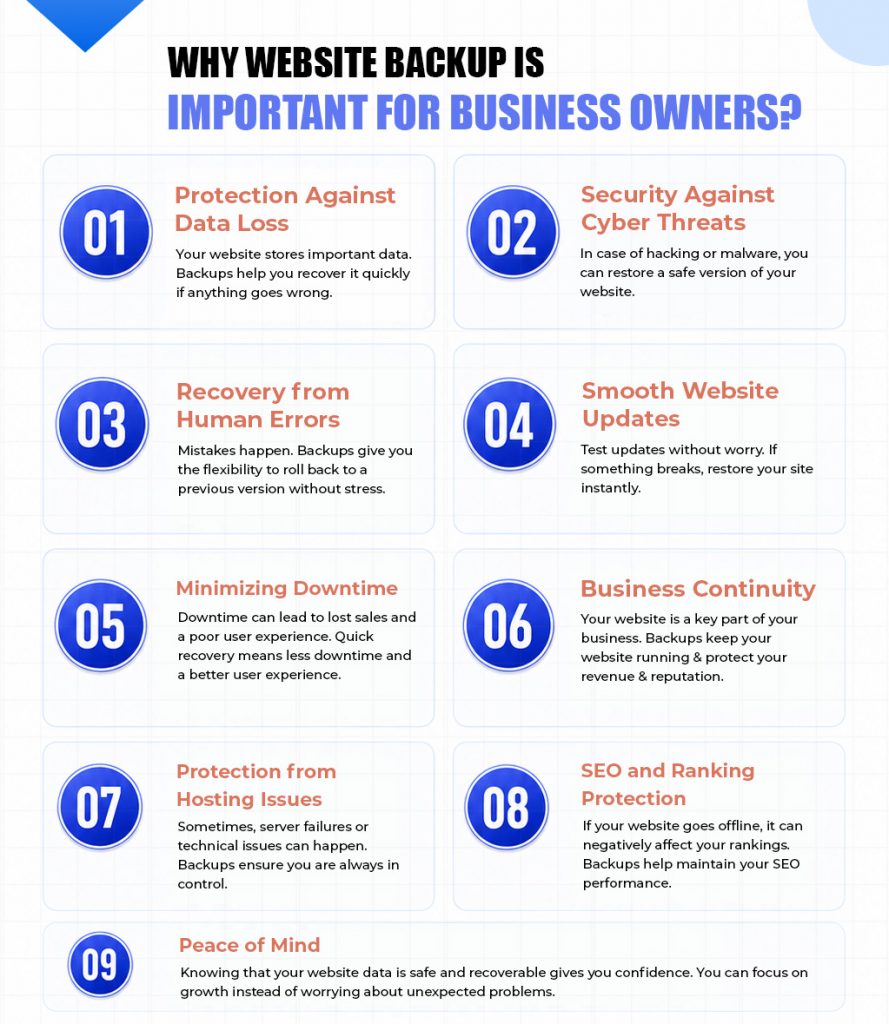
Running a business website is not just about being online. It is about keeping your data safe, your customers’ trust intact, and your operations running smoothly. Many business owners focus on design, marketing, and performance, but often overlook one critical element: website backup.
A website backup acts like a safety net. No matter what goes wrong, you always have a copy of your website that you can restore. Whether it is a technical issue, a cyberattack, or a simple human error, backups ensure your business does not suffer long-term damage.
Also Read: Biggest Security Threats to Websites
Also Read: How can you create a Secure Login for a Website?
Conclusion
Website backup is not an option; it is a necessity for every business owner. It protects your data, secures your website, and ensures your business stays online even in unexpected situations.
Investing in a proper backup strategy today can save you from major losses tomorrow. In the digital world, where risks are always present, having a reliable backup system is one of the smartest decisions a business owner can make.
Frequently Asked Questions
If your website changes daily, schedule automatic daily backups. For eCommerce stores, news sites, or frequently updated websites, more frequent backups, such as every few hours to help minimize potential data loss.
Without a backup, a cyberattack, server failure, accidental deletion, or software issue could permanently erase your website, customer data, and business information, leading to costly downtime and lost revenue.
A backup doesn’t prevent cyberattacks, but it gives you a clean copy of your website that can be restored quickly after a hack or ransomware incident, helping you recover with minimal disruption.
Yes. If you have a recent backup, you can restore your website, files, databases, and settings to a previous working state without having to rebuild everything from scratch.
A complete backup should include your website files, databases, images, themes, plugins, configurations, and email data (if hosted on the same server). This ensures a full recovery when needed.
No. It’s best to keep backups in a separate, secure location such as cloud storage, an offsite server, or a data room, for which you can discover the best data room providers. If your primary server fails or is compromised, your backup remains safe.
Manual backups require you to create them yourself, making them suitable before major changes. Automatic backups run on a schedule, ensuring your website is consistently protected without manual effort.
Keep multiple backup versions for at least 30–90 days. Businesses handling critical data or subject to compliance requirements may need to retain backups for several months or longer, depending on their recovery and regulatory requirements.

![Myths About Domain Names You Should Be Aware Of [Infographic]](https://www.hostitsmart.com/blog/wp-content/uploads/2026/03/Myths-About-Domain-Names-You-Should-Be-Aware-Of-Infographic.jpg "Myths About Domain Names You Should Be Aware Of [Infographic]")
![How Does Server Location Impact SEO? [Infographic]](https://www.hostitsmart.com/blog/wp-content/uploads/2020/05/How-does-server-location-have-an-impact-on-your-website-SEO.jpg "How Does Server Location Impact SEO? [Infographic]")
![Interesting Facts To Know About Domain Names [Infographic]](https://www.hostitsmart.com/blog/wp-content/uploads/2026/02/Interesting_Facts_To_Know_About_Domain_Names.jpg "Interesting Facts To Know About Domain Names [Infographic]")

