Key Highlights
- Linux hosting powers 77.3% of websites and works with WordPress, PHP, and MySQL. Windows hosting is essential for ASP.NET, MS SQL Server, and Microsoft technologies.
- Linux hosting supports WordPress, WooCommerce, Magento, PHP, Python, Ruby, and MySQL. Windows hosting supports ASP.NET, C#, VB.NET, MS SQL Server, SharePoint, and .NET frameworks.
- Choosing the right hosting provider as well. Look for 99.9%+ uptime, 24/7 platform-specific support, transparent pricing, easy scalability options, etc., for both Linux and Windows hosting.
Introduction
So you’re shopping for web hosting, and you are feeling a bit lost right now: what should I choose between Linux hosting vs Windows hosting? You might think, I use Windows on my laptop… does that mean I need Windows hosting?
Nope. That’s not how it works!
The difference between Linux and Windows hosting has almost nothing to do with what’s on your personal computer. It’s all about what’s running on the server that hosts your website.
Whether you’re launching your first business website, moving to a new host, or just trying to make sense of your hosting options, understanding the pros and cons of Linux vs. Windows hosting can save you money, headaches, and a whole lot of confusion down the road.
In this guide, we’re breaking down everything you need to know about Linux vs Windows hosting & beyond.
Ready? Let’s dive in!
What is Linux Hosting?
Linux hosting is web hosting that runs on servers powered by the Linux operating system. When you buy Linux hosting, you’re renting space on a server (think of it as a super-powerful computer that never sleeps) that uses Linux as its operating system.
Linux powers 96.3% of the world’s top 1 million servers. That’s HUGE!
Linux has become the de facto standard for web hosting because of its stability, security, and cost-effectiveness. For most websites, especially those running PHP-based applications like WordPress, Linux hosting is the natural choice.
But, What’s the Reason behind Linux Dominance?
1. It’s Open-Source (and Free)
Linux doesn’t require expensive licensing fees, which means hosting providers can offer it at lower prices, and those savings get passed directly to you.
2. It’s Rock-Solid Stable
Linux servers are known for running smoothly for months (even years) without needing to restart. Less downtime means your website stays accessible.
3. It Works With Popular Web Technologies
Most of the internet runs on technologies that were built for Linux.
➢ Common Uses and Supported Technologies
Common Uses:
➔ WordPress, Joomla, Drupal websites
➔ eCommerce stores (WooCommerce, Magento, OpenCart)
➔ Blogs and portfolio sites
➔ Custom PHP web applications
➔ Python and Ruby web apps
Supported Technologies:
➔ Languages: PHP, Python, Perl, Ruby
➔ Databases: MySQL, MariaDB, PostgreSQL
➔ Web Servers: Apache, Nginx, LiteSpeed
➔ Control Panels: cPanel, Plesk, DirectAdmin
➔ Frameworks: Laravel, Symfony, Django, Flask, Ruby on Rails
Also Read: Different Types of Web Hosting Services
➢ Who Should Choose Linux Hosting?
1. You’re Using Popular CMS Platforms
Building with Drupal, WordPress, or Joomla? Linux hosting is your best match. These platforms were designed for Linux servers and run most efficiently here. 43.5% of all websites use WordPress, and the vast majority run on Linux.
2. You’re Running an eCommerce Store
Selling online with any of the eCommerce platforms such as WooCommerce, Magento, or OpenCart? Linux gives you the speed and reliability essential for eCommerce. A 1-second delay can reduce conversions by 7% & linux hosting delivers performance without premium pricing, so you don’t miss out on conversions.
3. You’re Budget-Conscious
Linux hosting typically runs $3-10/month versus $5-15/month for Windows, which is 20-50% savings. No licensing fees mean quality hosting at lower costs.
4. You’re a First-Time Website Owner
New to websites? Linux hosting offers the easiest learning curve with one-click installers, massive community support, and endless online tutorials. Most beginner-friendly platforms run best on Linux.
5. You Don’t Need Microsoft Technologies
If you’re not specifically using ASP.NET, MS SQL Server, or .NET frameworks, Linux is your answer. Simple as that.
At Host IT Smart, our Linux hosting plans include one-click WordPress installation, free SSL, and 24/7 support to get you online fast.
What is Windows Hosting?
Windows hosting means your website runs on servers powered by Microsoft’s Windows Server operating system.
When you choose Windows hosting, you’re renting space on a server running Windows Server (typically versions like Windows Server 2019, 2022, or 2025). This server uses Microsoft’s IIS (Internet Information Services) as the web server software and is specifically designed to run Microsoft technologies seamlessly.
The key difference?
Windows hosting is built for websites and web applications that require Microsoft-specific technologies, particularly ASP.NET, MS SQL Server, and other .NET framework components.
For organizations invested in Microsoft technologies, Windows hosting provides the integrated ecosystem needed for mission-critical applications. The seamless integration between IIS, SQL Server, and .NET frameworks creates a powerful, enterprise-grade hosting environment.
➢ Why Choose Windows Hosting?
- Microsoft Technology Integration
If your website or application is built with ASP.NET, requires MS SQL Server databases, or needs to integrate with other Microsoft products like SharePoint or Exchange, Windows hosting is necessary. - Enterprise-Ready Infrastructure
Windows Server is designed for enterprise environments with robust security features, Active Directory integration, and seamless compatibility with Microsoft business tools.
- Familiar Development Environment
Developers working in Visual Studio with C# or VB.NET find Windows hosting a natural fit. The entire development-to-deployment workflow stays within the Microsoft ecosystem.
Also Read: Difference Between Shared Hosting And WordPress Hosting
➢ Common Uses and Supported Technologies
Common Uses:
• If AI defines your core value, a .AI domain delivers instant clarity.
• Corporate intranets using SharePoint
• Business applications requiring MS SQL Server
• Enterprise systems integrated with Active Directory
• Custom .NET framework applications
Supported Technologies:
• Languages: ASP.NET, C#, VB.NET, PHP (also supported)
• Databases: MS SQL Server, MS Access, MySQL
• Web Server: IIS (Internet Information Services)
• Control Panels: Plesk, WebsitePanel, SolidCP
• Frameworks: ASP.NET MVC, .NET Core, Entity Framework, Blazor
➢ Who Should Choose Windows Hosting?
1. You’re Building With ASP.NET or .NET Core
If your website or application is developed using ASP.NET, ASP.NET Core, C#, or VB.NET, Windows hosting is non-negotiable. These Microsoft technologies require Windows Server and IIS to function properly.
2. You Need MS SQL Server Databases
Running applications that specifically require Microsoft SQL Server? You need Windows hosting. While MySQL works on both platforms, MS SQL Server only runs on Windows infrastructure.
3. You’re Running Enterprise Microsoft Applications
Using SharePoint for collaboration, Exchange for email hosting, or need Active Directory integration? Windows hosting provides the native environment these enterprise tools require.
4. Your Development Team Uses Visual Studio
If your developers work primarily in Visual Studio and the Microsoft development ecosystem, Windows hosting creates a seamless workflow from development to production.
5. You’re Integrating With Microsoft Products
Need your website to connect with Office 365, Microsoft Dynamics, or other Microsoft business tools? Windows hosting ensures smooth, native integration without compatibility headaches.
➢ The Bottom Line
Choose Windows hosting if your project specifically requires Microsoft technologies. It’s that simple. Don’t choose it because you use Windows on your laptop; choose it because your application demands ASP.NET, MS SQL Server, or Windows-specific integrations.
At Host IT Smart, our Windows hosting plans come fully configured with the latest IIS versions, support for .NET frameworks, MS SQL Server databases, and Plesk control panel, giving your Microsoft-powered projects the environment they need to thrive.
Key Differences Between Linux and Windows Hosting
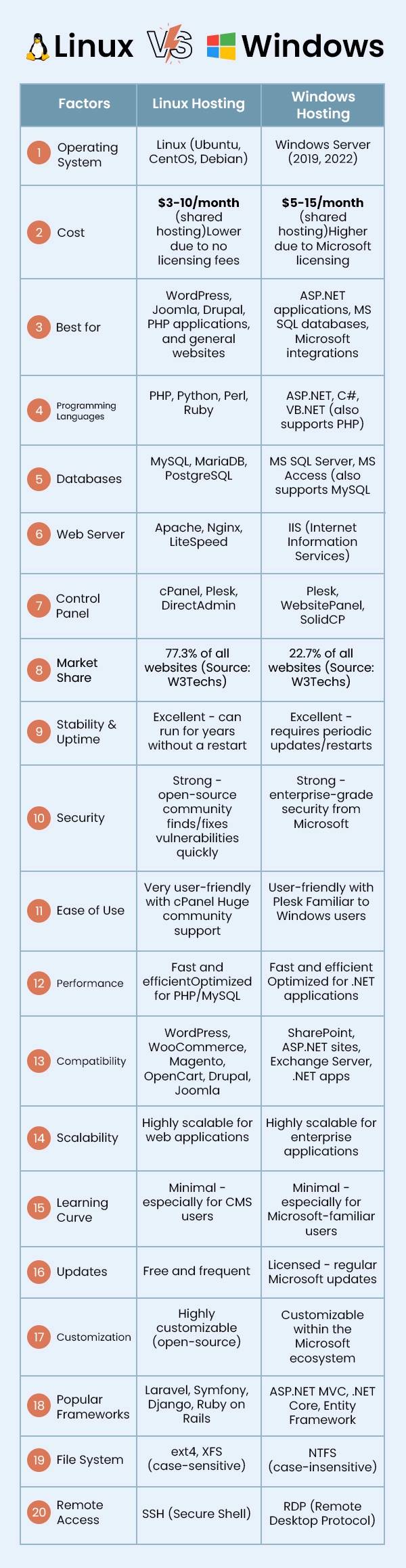
When comparing Linux vs Windows hosting, the choice isn’t about which is universally better; it’s about which fits your specific needs. The difference between Linux and Windows hosting comes down to the technologies your website requires and your budget.
Linux hosting dominates the web with 77.3% market share because it’s cost-effective, supports popular platforms like WordPress, and works with PHP/MySQL, the backbone of most modern websites.
Windows hosting serves a specific but crucial niche, 5.6% of websites use ASP.NET, powering enterprise applications that require Microsoft technologies like ASP.NET, MS SQL Server, and .NET frameworks.
Understanding Linux hosting vs Windows hosting differences helps you avoid costly mistakes like choosing the wrong platform and having to migrate later. Let’s break down what actually matters:
Also Read: Linux VPS vs Windows VPS – What Should You Choose?
What Does Linux vs Windows Actually Mean for You?
If you’re running WordPress, an eCommerce store with WooCommerce, or any PHP-based website, go with Linux. You’ll save money and get better compatibility.
If your developer says you need ASP.NET, MS SQL Server, or any Microsoft-specific technology, Windows hosting is your only real option. The extra cost is worth it for proper functionality.
At Host IT Smart, we offer both Linux and Windows hosting solutions optimized for performance, security, and reliability. Whether you need the flexibility of Linux or the Microsoft integration of Windows, we’ve got the right plan for your project.
Also Read: How to migrate a website from one server to another
How to Choose the Right Linux or Windows Hosting for Your Business?
The Linux vs Windows hosting decision directly impacts your website’s performance, security, costs, and scalability. Choose wrong, and you’ll face compatibility issues, migration headaches, and unnecessary expenses. Choose right, and you’ll have a solid foundation for growth.
Here’s your strategic guide to making the right Linux hosting vs Windows hosting choice:
1. What Technologies Does Your Website Need?
This is the dealbreaker question in the difference between Linux and Windows hosting.
Choose Linux if you’re using: PHP, Python, Ruby, MySQL, WordPress, Joomla, Drupal, WooCommerce, Magento.
Choose Windows if you need: ASP.NET, C#, VB.NET, MS SQL Server, SharePoint, Exchange, .NET frameworks.
Reality check: If you’re unsure what you’re using, you’re likely using PHP and MySQL (which means Linux). Developers working with Microsoft technologies always know they need Windows; it’s non-negotiable.
Common Mistake: Choosing Windows hosting just because you use Windows on your laptop. Your desktop OS and server OS are completely separate decisions.
Also Read: Which Technology is Best For Website Development?
2. Compatibility with Your Current or Planned Applications
★ Linux works best with:
• WordPress, WooCommerce, Magento (eCommerce)
• Most open-source CMS platforms
• cPanel control panel
• Popular plugins and extensions
★ Windows works best with:
• SharePoint, Exchange Server
• Active Directory integration
• Microsoft Dynamics CRM
• Custom .NET applications
Cost of getting it wrong: Migration can cost $500-$5,000+ depending on complexity, plus the risk of data loss and extended downtime.
At Host IT Smart, we offer free migration assistance for both Linux and Windows hosting, ensuring smooth transitions with zero downtime.
3. Performance & Speed
Linux Hosting Performance:
➔ Lightweight architecture – Uses fewer server resources for the same workload.
➔ Optimized for PHP/MySQL – The most common web technology stack.
➔ Efficient web servers – Apache and Nginx are highly optimized and battle-tested.
➔ Lower overhead – No GUI (graphical interface) consuming resources.
➔ Better for high traffic – Handles concurrent connections efficiently.
Linux hosting typically achieves faster response times for WordPress and PHP applications.
Windows Hosting Performance:
• Optimized for .NET applications – IIS and ASP.NET work seamlessly together.
• Strong MS SQL performance – Native database integration.
• Excellent for Windows workloads – .NET applications run faster on Windows than on Linux emulation.
• Enterprise-grade caching – Built-in optimization for Microsoft technologies.
For ASP.NET applications, Windows hosting delivers superior performance because the entire technology stack is designed to work together.
4. Security Considerations
Both platforms are secure when properly maintained.
Linux security: Open-source community quickly patches vulnerabilities. Strong permissions system. Regular free updates.
Windows security: Enterprise-grade Microsoft security. Regular patches. Built-in Windows Defender. Active Directory authentication.
Real risk factors: Outdated software, weak passwords, and unpatched vulnerabilities, not the platform.
At Host IT Smart, both platforms include free SSL, malware scanning, and DDoS protection for end-to-end security.
Also Read: Best Practices to Secure Your Website
5. Control Panels, Management & Customization
Your control panel is how you manage your website daily, installing apps, managing emails, and configuring settings.
★ Linux Control Panels::
• cPanel – It is one of the most popular control panels, beginner-friendly, with a one-click WordPress installer, and extensive tutorials available.
• Plesk – Modern interface, works on Linux and Windows, great WordPress toolkit.
• DirectAdmin – Lightweight, cost-effective alternative.
★ Windows Control Panels:
• Plesk – Top choice for Windows, manages IIS, MS SQL, and ASP.NET easily.
• WebsitePanel/SolidCP – Free options for Windows-specific features.
The Bottom Line: cPanel (Linux) is easiest for beginners. Plesk (Windows) works best for Microsoft environments.
6. Licensing and Cost Comparison
The Linux vs Windows hosting cost difference is significant over time.
Linux hosting costs:
• Shared: $3-10/month
• VPS: $20-80/month
• No licensing fees
Windows hosting costs:
• Shared: $5-15/month (20-50% more)
• VPS: $30-120/month
• Microsoft licensing fees add up
3-year cost difference: $72-180+ extra for Windows shared hosting alone.
However, if you need Windows technologies, the cost isn’t optional, because your app won’t run on Linux. If you’re running WordPress, PHP applications, or most common websites, choosing Windows hosting means paying 20-50% more for features you won’t use.
7. Expertise and Experience
Both platforms are secure when properly maintained.
Choose Windows if: Your developers specialize in .NET, C#, or your IT team manages Windows Server environments.
No expertise?
At Host IT Smart, our managed hosting includes expert support for both platforms; you don’t need to be a server expert.
8. Scalability & Future Growth Potential
Both platforms are secure when properly maintained.
Linux scalability: Cost-effective scaling from shared to enterprise. Lower licensing costs as you grow. Better cloud hosting economics.
Windows scalability: Excellent for Microsoft-heavy organizations. Azure integration. Licensing costs increase significantly with growth.
Bottom line: Linux typically offers better scaling economics for small to medium businesses. Windows works well for enterprises invested in Microsoft ecosystems.
9. Developer Needs: Scripting Languages & Server Environments
If you have developers building custom applications, their workflow and requirements should drive your decision.
➔ Linux Server Environment:
Linux hosting provides SSH command-line access, root control on VPS hosting server or dedicated plans, and tools like Git, Composer, npm, and pip for development.
You can run multiple PHP versions simultaneously, automate tasks with cron jobs and shell scripts, and configure servers using .htaccess files and Nginx settings.
It’s ideal for developers who prefer command-line control and open-source tools.
➔ Windows Server Environment:
Windows hosting offers Remote Desktop (RDP) graphical access, Visual Studio integration, and tools like NuGet and SQL Server Management Studio.
Automation uses Task Scheduler and PowerShell scripting, with Azure DevOps for CI/CD workflows. Configuration happens through web.config files and IIS Manager, supporting multiple .NET Framework versions for different applications.
10. Quality of Support
When your website goes down at 2 AM or you encounter configuration issues, quality support becomes invaluable. So, make sure you don’t compromise on that while looking for a provider.
You should look for 24/7 availability, platform expertise, fast response times, multiple support channels, proactive monitoring, etc.
At Host IT Smart: Our support team includes both Linux and Windows specialists available 24/7/365, along with live chat, phone, and ticket support, proactive server monitoring, free migration assistance, etc.
Also Read: How Many Websites Can You Host on One Server?
How to Choose a Web Hosting Provider for Linux and Windows Hosting?
Picking the right hosting provider matters just as much as choosing between Linux and Windows hosting. You could select the perfect platform, but still end up with slow speeds, terrible support, or unexpected downtime if your provider isn’t up to par.
Here’s what to look for:
1. Performance & Reliability
Look for providers offering 99.9%+ uptime guarantees, SSD storage, and optimized infrastructure. Because the provider’s performance directly impacts your success.
2. Quality Support
When your site goes down at 2 AM, you need real help fast. Look for 24/7/365 availability with platform-specific experts (Linux specialists for Linux, Windows experts for Windows) who respond in under 15 minutes for critical issues.
3. Security Features
Free SSL certificates, automatic malware scanning, DDoS protection, daily backups, and firewall protection should be standard, not expensive add-ons. Security is non-negotiable for protecting your business and customers.
4. Pricing Transparency
Watch for hidden costs and renewal price shocks. Choose providers with clear upfront pricing, reasonable renewals, no setup fees, and free migration assistance. The Linux vs Windows hosting cost difference is already significant; don’t let surprise fees make it worse.
5. Scalability Options
Your business will grow, and your hosting should grow with you. Look for easy upgrade paths from shared to VPS to dedicated hosting without forced migrations, plus flexibility to switch between Linux and Windows if needed.
6. Reputation & Reviews
Don’t just trust marketing claims; check independent review sites as well. Look at how long they’ve been in business and how they handle customer complaints.
To make your search easier, Host IT Smart can help!
We provide both Linux and Windows hosting with 99.9% uptime, 24/7 expert support, free SSL and backups, transparent pricing, cPanel/Plesk pre-configured, free migration, and a 30-day money-back guarantee.
Explore our hosting plans or talk to our experts for personalized recommendations.
Also Read: Know What Really Happens When You Choose Cheap Hosting
Conclusion
Choosing between Linux vs Windows hosting doesn’t have to be complicated. If you’re running WordPress, an eCommerce store, or any PHP-based website, Linux hosting gives you better performance at a lower cost.
If your application specifically requires ASP.NET, MS SQL Server, or Microsoft integrations, Windows hosting is your only real option.
Don’t overthink it. Look at your technology requirements, consider your budget, and choose the platform that matches. And remember, a good hosting provider matters just as much as the operating system, quality infrastructure, reliable support, and transparent pricing make all the difference.
If you’re still weighing your options or need help figuring out which platform fits your project, Host IT Smart is here to help make sense of it all.
Frequently Asked Questions
Yes, Linux hosting is better for 95% of websites. It’s cheaper, faster for PHP/MySQL, and compatible with most web platforms. Windows hosting is only necessary if you specifically need ASP.NET, MS SQL Server, or Microsoft enterprise tools.
Linux hosting is faster for most websites. It uses fewer resources, has lower overhead, and performs better for PHP/MySQL applications that power 77.5% of all websites. Windows hosting only outperforms Linux when running ASP.NET applications.
No, absolutely not. Linux programs require Linux hosting, and Windows programs require Windows hosting. This difference between Linux and Windows hosting is non-negotiable; choose wrong, and your website won’t work.
Windows hosting is the only option (not just better) when you need ASP.NET, ASP.NET Core, MS SQL Server, SharePoint, Exchange Server, or .NET Framework. If your application is built with these technologies, Linux hosting won’t work.
Linux hosting is smarter for WordPress (43.5% of all websites), any PHP-based platform, eCommerce (WooCommerce, Magento), blogs, small businesses, and startups. It’s 20–50% cheaper, more stable, and has better community support.
They don’t prefer it; they need it. Only 22.7% of websites use Windows hosting because their applications require Microsoft-specific technologies, whereas Linux hosting dominates with 77.3% market share.
Linux hosting: 95% of businesses, bloggers, small businesses, eCommerce stores, agencies, startups, and anyone using WordPress, PHP, or standard web platforms.
Windows hosting: Enterprises locked into Microsoft ecosystems, businesses running legacy ASP.NET applications, companies requiring SharePoint/Exchange integration, organizations with dedicated .NET development teams.
Linux hosting dominates because it’s factually superior for web hosting:
• It’s free (no licensing fees make Linux 20–50% cheaper)
• More stable (can run for years without a restart)
• Optimized for PHP/MySQL (which power most websites)
• Compatible with WordPress and popular platforms
• Holds 96.3% market share among top servers

I’m Ekta Jesani, a content writer who helps businesses put their complex jargon into words their audience actually understands. I believe clear communication builds better know-how, drives conversions, and strengthens the bottom line – and that’s exactly what I aim to achieve with my content.