● Websites are perfect for sharing information, while web applications focus on user interaction, personalised experiences, and functionality.
● If you want a simple online presence, go for a website, but if your business needs interactive features, a web application is the way to go.
● The choice isn’t just about tech – it’s about your goals, budget, user needs, and how you plan to grow your digital presence in the future.
You’ve probably noticed how the line between websites and web applications keeps blurring these days. Teams often throw both terms around interchangeably in sprint meetings, planning decks, or client calls.
“Let’s build a website for this,” someone says, while another chimes in, “No, we need a web app.”
And before you know it, you’re knee-deep in debates about functionality, user interactions, scalability, and backend complexity – all without a clear foundational understanding of what truly differentiates the two.
A website is informational. A web application is interactive. The difference is not just in functionality, but in how users engage with your platform and how your team manages it behind the scenes.
– Martin Fowler, Software Developer & Author
martinfowler.com
The reality is, knowing whether you’re building a website or a web application isn’t just semantics. It directly affects your tech stack decisions, project timelines, security protocols, and how your users experience the end product.
So, let’s clear this up once and for all and unpack what really sets a website apart from a web application – and why it matters for your next build.
What is a Website?
When you think about a website, think of it as your company’s virtual presence. It’s there to showcase who you are, what you offer, and how people can reach you. Users come to your site, read your content, maybe check your services or blog, and leave with the information they need. That’s it.
There’s no complex processing happening on their end – they’re just consuming what you’ve put out there. All in all, a website is all about presenting information clearly and building credibility online.
Also Read: What is a Website Name?
Key Website Features You Should Know About!
- Static or dynamic pages – Some types of websites are simple with fixed content, while others pull dynamic data (like blogs updating posts regularly).
- Focused on information – The main goal is to share details about your business, services, portfolio, or ideas clearly.
- Contact points – Whether it’s a form, email link, or phone number, websites usually have ways for people to reach out.
- Minimal user interaction – Apart from clicking around, reading, or filling simple forms, there’s no complex processing happening on the user’s side.
- Minimal backend logic: Unlike web apps, websites don’t perform tasks like calculations, data processing, or user-specific operations on the frontend. That’s why creating a website is relatively simple compared to a web application.
- No personalised user experience: Websites generally serve the same content to every visitor, without user-specific dashboards or data.
Also Read: Industries That Need Websites the Most
What is a Web Application?
A web app is basically a website that does more than just show information – it lets users do things. Think of it as an interactive tool you access through your browser.
For example, when you log into Gmail to manage your emails, use Canva to design posts, or work in Google Docs, you’re using a web app.
It’s built to handle user inputs, process data, and give personalised outputs in real-time. Unlike websites, web apps have complex back-ends and front-ends working together to create seamless, app-like experiences directly on the web.
Also Read: Difference Between Web Application and Desktop Application
Key Web App Features You Should Know About!
- Interactive in Nature: Unlike websites that mainly show information, web apps let users actually do things, like editing documents, booking tickets, or managing tasks.
- You usually need to log in: Most web apps have user accounts so you can save your work, access your data, and get a personalised experience every time.
- A lot is happening behind the scenes: Web apps process data, run calculations, connect with databases, etc, to keep everything working smoothly.
- Feels like using a native app: Even though you’re on a browser, web apps feel fast and interactive, almost like an app you’ve installed on your phone or computer.
- Helps you complete tasks: At the end of the day, a web app’s main job is to help users get something done – whether it’s sending an email, creating a design, or managing finances.
- Needs constant updates: Web apps are interactive and user-focused & they require regular updates, security patches, and feature improvements to keep running well.
Also Read: How Can You Start an Online Business With No Money?
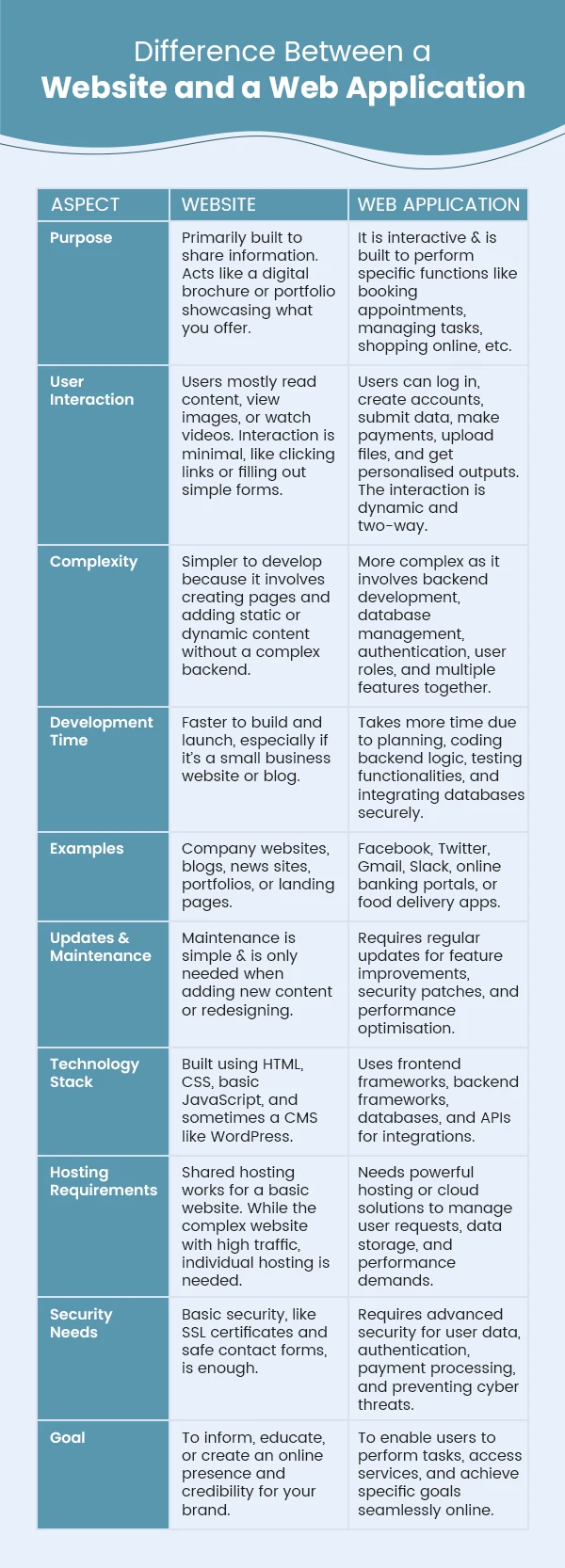
Key Differences Between a Website and a Web Application
Also Read: What is the Difference Between Frontend and Backend Development?
When to Use a Website?
➔ If your main goal is to inform, not interact
You just want to tell people about your business, showcase your services, location, contact info, and business story, or share your thoughts. No complex features needed.
➔ When you’re building an online presence quickly
A website is your go-to if you need to establish credibility fast, like launching a portfolio, company page, or landing page for an upcoming product.
➔ When you’re targeting a broad audience with the same message
Websites work best when everyone visiting needs to see the same information, like company news, blogs, or service details.
➔ When SEO is a priority
Websites are built with search in mind & if you want to be in front of your customers(constantly), then you can go for a website to rank better and pull in organic traffic.
➔ If budget and time are tight.
Websites are faster to build, easier to maintain, and affordable overall compared to web apps with complex backend logic.
Also Read: What Makes a Good Website Checklist? A Complete Guide
When to Use a Web Application?
➔ When your users need to interact, not just browse
If you have an interactive goal & you would want people to do things, like manage tasks, edit files, make bookings, or shop online, a web app is the clear choice.
➔ When personalisation is non-negotiable
If your users expect customised dashboards, personalised feeds, or user-specific data each time they log in, you need the dynamic capabilities of a web app.
➔ When you need secure user accounts
Any time you require users to sign up, log in, and save their data securely, it makes sense to build a web app.
➔ When your service is the tool
If your core business is providing an online tool or software, like a design editor, CRM, project management system, or finance tracker, web apps are ideal.
➔ When real-time updates are important
Apps that need to show changes instantly, like live data dashboards or collaborative platforms, rely on web app architecture.
➔ When you plan to scale with more features
If your vision involves adding advanced features, integrations, and workflows over time, web apps provide the flexibility and structure to support that growth.
➔ When you want an app-like experience in browsers
Modern web apps can feel like native apps, with fast interactions and offline capabilities, without forcing users to install anything.
Also Read: Know the Difference Between CSS and CSS3
Advantages of Websites
- Simple and easy to develop: Websites are quite simple to use, develop & maintain. You don’t need complex backend logic or heavy frameworks. It is great when you have basic needs & need to launch fast without over-engineering.
- Lower development and maintenance costs: Because websites are simpler, they cost less to build and maintain. You’re not investing in backend development, API management, or advanced security layers.
- Faster load times: Websites generally load faster because they’re lighter and don’t have to handle complex user interactions or dynamic data processing. This means a better user experience, lower bounce rates, and improved SEO, which makes your website professional.
- Ideal for informational content: If your main goal is to share static content, like blogs, service pages, company info, or resources, websites are built exactly for that.
- Broader accessibility: Websites are accessible across all browsers and devices without needing installations or specific OS compatibility. Anyone with an internet connection can access them instantly, making it ideal for a large audience.
- Better for SEO and search visibility: Websites are naturally structured for SEO. Search engines can easily crawl and index their static pages, helping your business rank higher and drive organic traffic over time.
- Less dependency on backend infrastructure: Websites don’t rely heavily on databases or server-side logic. So, you can avoid backend downtime issues and complicated server maintenance, keeping things smooth and stable.
- Enhanced user engagement: Websites are built to be clean, clear, and easy to navigate. This simplicity improves user experience. Visitors find what they need without distractions, increasing engagement and reducing bounce rates.
Also Read: Which Technology is Best For Website Development?
Challenges in Website Development
- Designing for mobile responsiveness: Mobile responsiveness is no brainer for websites today. But, to make sure your design adapts well across screen sizes is somewhat tricky, especially if you have complex layouts or interactive elements.
- Ensuring fast load times and performance: Keeping your website fast isn’t easy. Heavy images, messy code, or too many plugins can slow things down, and users will leave if it takes even a second too long to load. Staying on top of performance is an ongoing challenge that needs constant optimisation.
- Keeping content updated and relevant: A website isn’t a “set it and forget it” project. Content quickly goes out of date, and if visitors see stale information, it hurts your credibility. Regularly updating blogs, services, and other pages takes effort but is crucial to stay useful and rank well in search results.
- Navigating browser compatibility: Different browsers can display your website differently, and ensuring everything looks and works the same on different browsers can be a headache & but also a time-consuming task.
- Search engine optimization challenges: Getting your website to rank isn’t just about adding keywords on a page. You need the right site structure, fast load times, quality backlinks & whatnot. SEO is an ongoing challenge that requires technical tweaks and consistent content efforts.
- Security threats and vulnerabilities: Websites are constant targets for hackers looking for loopholes. And, keeping your site secure requires regular updates, SSL implementation, and proactive monitoring; that’s quite a challenge.
- Maintaining user privacy and data protection: Users care about their privacy, and so do regulations like GDPR. Ensuring your website collects, stores, and uses data responsibly isn’t always simple. You need proper consent, updated privacy policies on the website, and secure data handling to build user trust.
- Understanding the benefits of ISO 27001 provides a structured framework for managing information security, helping ensure that user data is protected, compliance requirements are met, and trust with your audience is strengthened.
- Handling traffic spikes and scalability: Your website might handle normal traffic just fine, but sudden spikes during a sale or after a viral post can make things slow unless you have a good web hosting plan that can save you from any crises.
- Integrating third-party tools and services: There are so many integrations & they rarely work seamlessly out of the box. APIs change, plugins conflict, and getting everything to work together smoothly is challenging than expected.
- Keeping up with evolving web technologies: Web development never stands still. New frameworks, design trends, security standards, and browser updates keep coming. But, to keep it all functional, fast, and relevant in a rapidly changing landscape is sometimes not that easy.
Also Read: WordPress Vs PHP Websites – Difference to Know
Advantages of Web Applications
- Enhanced user interaction and experience: Web apps let your users actively engage rather than just read or view content for a productive experience. It keeps them satisfied and increases the chances they’ll keep using your app regularly.
- Real-time data processing: Need to offer instant updates, calculations, or live data sharing to your end users? Web apps handle that seamlessly, making collaboration and workflows smoother.
- Cross-platform accessibility: Web apps run in the browser, so they work on any device, desktops, laptops, tablets, or mobiles without needing separate versions. Less hassles, better interactions.
- Scalability and flexibility: Web apps are built to grow with your business. You can add new features, modules, integrations, etc, as your user base expands without rebuilding. This is important when you are thinking long-term.
- Centralized data storage and management: All user data and app functionalities are stored centrally on the server. Users receive consistent data access, and administrators can manage everything from a single location without the need for scattered systems.
- Automation of tasks and processes: Web apps can automate repetitive tasks like sending notifications, generating reports, or processing user inputs. This saves time, reduces manual errors, and boosts overall operational efficiency.
- Enhanced security features: Web apps have advanced security measures like user authentication, data encryption, and role-based access control. It helps you keep sensitive data protected, along with user-focused features and accessibility.
- Integration with third-party services: Web apps also mean seamless third-party integrations. No matter what your integration requirements are, web apps handle these integrations smoothly. It keeps your workflows efficient and your platform powerful.
- Cost-effectiveness for businesses: While web apps can have higher upfront costs than websites, they’re often more cost-effective in the long run. You build once and serve users across all devices without developing separate native apps, reducing total development and maintenance costs.
- Continuous updates and improvement: Unlike native apps that require user downloads for every update, web apps update instantly on the server side. Users always access the latest version without any extra steps, and your team can roll out improvements faster.
Also Read: Top 10 Best Code Editors & IDEs for Python
Challenges in Web Application Development
- Handling complex user interactions: Web apps are highly interactive. Building & maintaining all these interactive features without bugs or glitches takes careful planning, strong front-end logic, and lots of testing.
- Security and data privacy concerns: With web apps handling user accounts, payments, and sensitive data, security becomes critical. Handling all the user data & security best practices is tough. One small loophole can risk user trust and your business reputation.
- Scalability and performance optimisation: As your user base grows, your web app needs to handle more data and simultaneous requests without slowing down or crashing. Optimising for performance and planning a scalable architecture from the start is quite a challenge.
- Cross-browser compatibility: Different browsers interpret code in their own ways, and with web apps’ complex functionalities, ensuring everything works perfectly on all browsers can be a real headache.
- Real-time data handling and synchronization: Users expect instant updates without refreshing, whether it’s chatting, booking slots, or updating dashboards. Building real-time capabilities with smooth data syncing across all users and devices is technically demanding and requires strong backend capabilities.
- Continuous maintenance and updates: Unlike static websites, web apps constantly require updates to identify and fix bugs, enhance security, and add new features. Continuous maintenance isn’t optional – it’s necessary to keep your app running smoothly and your users happy.
- High development and resource costs: Building a web app isn’t cheap. It requires skilled developers, designers, testers, and often a dedicated backend team. The complexity of interactive features, security, and performance optimisation adds up to higher costs compared to simple websites.
- Integration with third-party services and APIs: Web apps often rely on multiple external APIs for payments, authentication, data storage, or analytics. But APIs change, fail, or conflict with other parts of your app, making integration and long-term maintenance challenging and time-consuming.
- Managing state and data persistence: Web apps handle complex data flows such as user sessions, real-time updates, and offline storage. Managing state efficiently across different components and ensuring data consistency without slowing down performance requires solid architecture and expertise.
Conclusion
Choosing between a website and a web application isn’t about which is better – it’s about what fits your business goals right now. If you simply want to showcase your brand, services, or products and build credibility, a website does the job perfectly.
But if you want users to log in, interact, make bookings, place orders, or use personalised features, then a web application is what you need.
At the end of the day, it’s about how you want your users to engage with you online. Take time to understand their needs and your future plans before making a decision. The right choice will not only make things easier for your team but also create a smoother experience for your users.
Frequently Asked Questions
Yes, absolutely. You can upgrade a simple website into a full-fledged web application by adding interactive features, user logins, dashboards, or any functionalities that make it more dynamic and user-focused. You just need the right backend development to handle these interactive features.
Not always. If your goal is just to provide information, a website is enough. But if you want users to interact, make purchases, manage accounts, or use specific tools online, then a web application becomes essential.
Both use similar core technologies like HTML, CSS, and JavaScript. For web applications, you’ll also need backend frameworks like Django, Flask, Node.js, or Ruby on Rails, along with databases and APIs for more advanced features.
Web applications are usually more expensive because they involve backend development, user authentication, security, and database management. Website costs also vary, but generally it is simpler & cost-effective, comparatively.
Yes, it can. Many businesses host their website and web application on the same server, as long as the server has enough resources to handle both smoothly.
However, if your web app handles heavy traffic, payments, or real-time features like chats, it’s better to use a dedicated server or cloud hosting to maintain performance and avoid downtime.
Facebook is a web application. While it looks like a website, it has interactive features, user accounts, messaging, feeds, and many functionalities that make it a powerful web app.