Introduction
Building a website might sound technical, but it does not have to be complicated. Today, anyone can create a professional-looking WordPress website without coding knowledge. With the right steps and tools, you can go from idea to live website faster than you think.
As 48% of people consider design the most important feature of any website, WordPress offers a professional design that can be really helpful for your business.
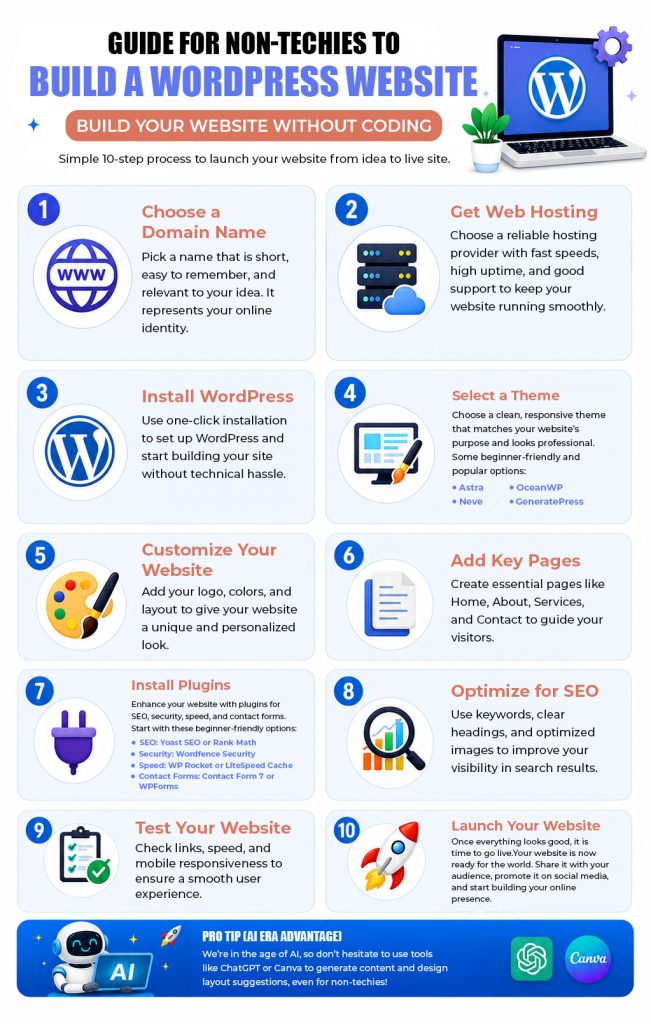
This guide is designed like an infographic, breaking down the process into simple, easy-to-follow steps so even beginners can confidently get started.
Also Read: Benefits of WordPress Development For Your Website
Also Read: Complete Pre-Launch WordPress Website Checklist
Conclusion
Creating a WordPress website is no longer limited to developers. With the right approach, even non-techies can build a fully functional and professional website.
The key is to take it step by step. Start with a domain and hosting, set up WordPress, customize your design, and add content that reflects your goals.
Over time, you can improve and grow your website as your needs evolve. The most important thing is to start.
Frequently Asked Questions
ChatGPT can help you generate website content, write code snippets, recommend plugins, troubleshoot issues, and guide you through setup. However, you still need to build, customize, and publish the website using WordPress or other website-building tools.
Yes. WordPress is beginner-friendly, especially when combined with drag-and-drop page builders and ready-made themes. With basic guidance and practice, most beginners can create a professional website without prior coding experience.
You can learn the basics of WordPress in 3 days, including installing WordPress, creating pages, publishing blog posts, and managing themes and plugins. Becoming proficient in customization, SEO, and advanced features will take more hands-on experience.
No. WordPress remains one of the world’s most popular content management systems in 2026. It continues to receive regular updates, supports modern web technologies, and powers millions of websites across blogs, businesses, eCommerce, and enterprise platforms.
It depends on your needs. Wix is easier for beginners who want a quick, all-in-one website builder, while WordPress offers greater flexibility, customization, scalability, and ownership, making it the better choice for growing websites and businesses.
No. You can build and manage most WordPress websites without writing code. However, learning basic HTML, CSS, or PHP in web development can be useful if you want to create custom designs or add advanced functionality.

![Interesting Facts To Know About Domain Names [Infographic]](https://www.hostitsmart.com/blog/wp-content/uploads/2026/02/Interesting_Facts_To_Know_About_Domain_Names.jpg "Interesting Facts To Know About Domain Names [Infographic]")
![How Does Server Location Impact SEO? [Infographic]](https://www.hostitsmart.com/blog/wp-content/uploads/2020/05/How-does-server-location-have-an-impact-on-your-website-SEO.jpg "How Does Server Location Impact SEO? [Infographic]")