Introduction
Hosting a website may sound technical, but it is actually a simple and structured process when broken down into clear steps. Whether you are starting a blog, business website, or online store, all you need is the right approach and a few essential components.
Think of it like setting up a shop. You need a name, a space, and a way for people to find you. In the online world, this translates to a domain name, web hosting, and a website setup.
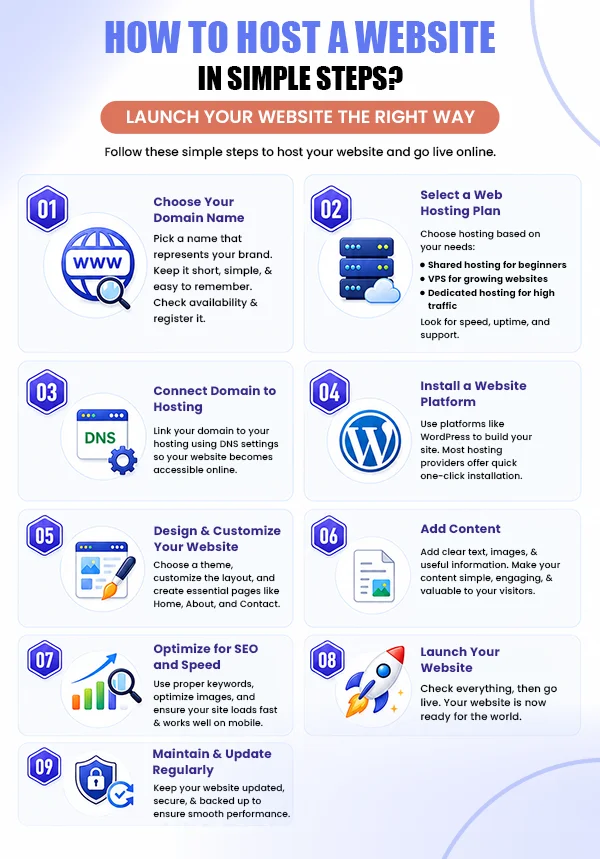
This infographic-style guide walks you through the process in a simple, easy-to-follow way so you can go from idea to live website without confusion.
Also Read: Is Making a Website Hard – Know the Truth
Also Read: Best Web Hosting Control Panels (Paid+Free)
Conclusion
Hosting a website is a straightforward process when you follow the right steps. From choosing a domain name to launching your site, each step builds the foundation of your online presence.
With the right hosting, proper setup, and consistent updates, you can create a website that is fast, secure, and ready to grow. Whether you are starting small or planning to scale, a well-hosted website sets you up for long-term success.
Frequently Asked Questions
Before hosting your website, you will need to buy a domain name, a web hosting plan, and your website files or a website builder. If you are starting from scratch, many hosting providers offer one-click website builders and WordPress installation.
No, but it’s highly recommended. While you can access your website via a temporary server address, a custom domain makes it easier to find, remember, and trust.
Yes. Modern hosting services include user-friendly website builders and one-click CMS installations like WordPress, allowing you to build and manage a website without writing code.
A domain name is your website’s address (such as yourwebsite.com), while web hosting is the server space where your website’s files, images, and data are stored. You need both to make your website accessible online.
Your website can be live within minutes after uploading your files. However, if you’ve just connected a new domain, DNS propagation may take up to 24–48 hours before it’s accessible worldwide.
Shared hosting is a hosting type that is usually the best hosting for beginners because it’s affordable, easy to manage, and provides enough resources for personal websites, blogs, and small business sites, whether it’s a static or Dynamic website.
Yes. Most hosting providers support website migration, and many even offer free migration services to help you move your website to another server with minimal downtime.
The cost depends on the hosting type and features you need. Shared hosting is the most affordable option, while VPS server hosting, cloud, and dedicated hosting cost more as they offer greater performance and control.
Yes, many hosting plans allow you to host multiple websites under a single account. The exact number depends on the plan’s features and resource limits.
Yes, free web hosting is available, but it often comes with limitations such as ads, limited storage, slower performance, and fewer features. For a professional or business website, paid hosting is a much more reliable option.

![How Does Server Location Impact SEO? [Infographic]](https://www.hostitsmart.com/blog/wp-content/uploads/2020/05/How-does-server-location-have-an-impact-on-your-website-SEO.jpg "How Does Server Location Impact SEO? [Infographic]")

