| Getting your Trinity Audio player ready... |
Introduction
In 2026, eCommerce security is a business priority (not just a technical issue). Online stores now handle more data and payments, while attackers are becoming more automated.
A hacked store can lead to immediate financial losses and operational disruptions. The longer-term impact is often worse, as damaged trust reduces future conversions.
AI is changing how attacks work, making them faster and harder to detect. In this environment, security directly affects trust, and trust directly affects sales.
Don’t worry, this page tackles why eCommerce sites need extra security in 2026. Read on to learn how to secure your online store with best practices and bonus tips.
Why Are eCommerce Websites Bigger Targets in 2026?
eCommerce websites are becoming bigger targets in 2026 because they now combine high-value data and complex systems. Not to mention fast-growing digital transactions.
As online retail scales, it also creates more opportunities for attackers to find weak points. Here’s why they are the biggest targets this year:
- ➢ The rise of AI-powered cyberattacks: Attackers now use automation and AI tools to launch faster and more scalable attacks than before.
- ➢ Online stores processing high-value customer data: This includes payment details and personal information, making them direct targets for theft and identity attacks.
- ➢ Card-not-present fraud is growing rapidly: More online purchases without physical verification make stolen credentials easier to exploit.
- ➢ Attackers targeting small and mid-sized enterprises (SMEs): They are no longer focused only on large enterprises but on SMEs. The problem is that smaller stores often have weaker defenses, making them easier entry points.
Many eCommerce businesses today operate across APIs, third-party apps, payment tools, cloud infrastructure, and multiple customer touchpoints at once. While these integrations improve scalability and customer experience, they also expand the attack surface significantly if businesses do not actively monitor and secure every connected layer.
Why do modern eCommerce platforms have larger Attack surfaces? Due to their technical complexity and integrations. Every added system or connection increases potential entry points for attackers.
Cases in point:
- ➜ Headless commerce platforms risks come from separating the frontend and backend, which increases exposed endpoints.
- ➜ API vulnerabilities can be exploited when authentication or validation is weak.
- ➜ Third-party app/plugin exposure can introduce security gaps if they are not properly maintained or vetted.
- ➜ Multi-vendor integrations also expand risk by connecting multiple external systems with different security standards.
The worldwide eCommerce market was valued at about $33.91 trillion in 2025 and is expected to reach $155.98 trillion by 2033. This growth is largely driven by rising internet access and smartphone usage. Especially in emerging markets across the Asia Pacific, Latin America, and Africa.

As eCommerce continues to grow, website security is becoming even more important for both businesses and customers. A secure online store helps protect transactions, build customer trust, and support long-term business growth.
Also Read: Types of Information eCommerce Sites Need to Protect
Top eCommerce security threats in 2026
eCommerce website security threats in 2026 are becoming more automated and more intelligent. Attackers now use AI and automation to scale attacks across thousands of stores at once.
Understanding these threats is key to staying protected. Below are common security threats eCommerce businesses are facing:
| eCommerce Security Threats | Overview |
| AI-generated phishing attacks | Attackers use AI to create highly convincing emails and messages that trick users into revealing login or payment details |
| Deepfake customer support scams | Scammers use AI-generated voices or videos to impersonate support agents and manipulate customers or staff |
| Account takeover (ATO) attacks | Hackers gain access to customer accounts using stolen credentials and then make unauthorized purchases or changes |
| Credential stuffing attacks | Attackers use leaked username-password combinations to automatically try logging into eCommerce accounts |
| Checkout bot attacks during sales | Bots flood checkout systems during promotions to grab limited stock or disrupt legitimate purchases |
| Fake refund and chargeback fraud | Fraudsters exploit refund systems or file false chargebacks to steal money or goods |
| Magecart and payment skimming attacks | Malicious scripts are injected into checkout pages to steal credit card data during payment |
| Ransomware targeting online stores | Attackers encrypt stored data and demand payment in exchange for restoring access |
| Supply chain and plugin vulnerabilities | Weaknesses in third-party tools or plugins are used to infiltrate otherwise secure eCommerce sites |
| API abuse and automated attacks | Unprotected APIs are exploited to extract data, manipulate transactions, or overload systems |
| Malicious AI agents and spoofed bots | Fake AI-driven bots mimic real users or services to bypass security and perform harmful actions |
| Zero-day vulnerabilities in CMS and plugins | Unknown software flaws are exploited before developers can release security patches |
| Insider threats and access misuse | Employees or contractors misuse their access rights to steal data or damage systems |
| Session hijacking and cookie theft | Attackers steal active session data to impersonate logged-in users without credentials |
| Cross-site scripting (XSS) attacks | Malicious scripts are injected into websites to steal user data or manipulate page behavior |
| SQL injection attacks | Attackers insert harmful database queries to access, modify, or delete sensitive information |
| DDoS attacks on eCommerce websites | Large volumes of traffic are used to overwhelm websites and cause downtime |
| Malware hidden inside themes or plugins | Infected themes or plugins introduce malicious code that compromises site security |
Also Read: How to Benchmark Website Performance?
Why Traditional Security is No Longer Enough?
Traditional eCommerce security tools were built for a slower and less automated threat landscape. In 2026, attackers move faster, use AI, and target multiple layers of a system at once. Here’s why traditional security is no longer enough:
- ➜ Hackers now use AI, too. Attackers use AI to automate scanning and phishing at a scale that traditional defenses struggle to match.
- ➜ Password-only protection is outdated. Passwords alone are no longer enough because they can be easily stolen or reused in credential attacks.
- ➜ Basic firewalls cannot stop modern fraud. Simple firewalls are not designed to detect advanced bot behavior, account takeovers, payment fraud, and other cyberattacks.
- ➜ Why “installing SSL” is not enough anymore. An SSL certificate only encrypts data in transit, but it does not protect against attacks happening at the application or account level.
- ➜ The problem with relying only on platform security. Platform-level security alone is not enough because attackers often exploit custom code and plugins.
- ➜ Security gaps created by third-party tools. Third-party apps and integrations can introduce vulnerabilities if they are not regularly updated or properly secured.
- ➜ Traditional eCommerce security approaches were designed for a much simpler and slower digital environment. But in 2026, threats are more automated and intelligent, attacking multiple layers simultaneously and making older defenses less effective.
Also Read: What Makes a Good Website Checklist?
How Security Impacts SEO, Trust & Revenue?
Security plays a direct role in how customers perceive an online store. When an eCommerce website looks unsafe or shows warning signs, users are less likely to trust it and complete a purchase.
That loss of confidence quickly translates into lower conversions. Especially as more businesses adopt digital payments and AI-driven commerce.
Security issues can also impact SEO performance, as Google may flag or penalize hacked websites. At the same time, problems like slow website loading speeds or broken checkout flows increase bounce rates and push potential customers away.
More than 80% of merchants now say technological infrastructure is their biggest fraud challenge, highlighting how closely performance and security are connected.
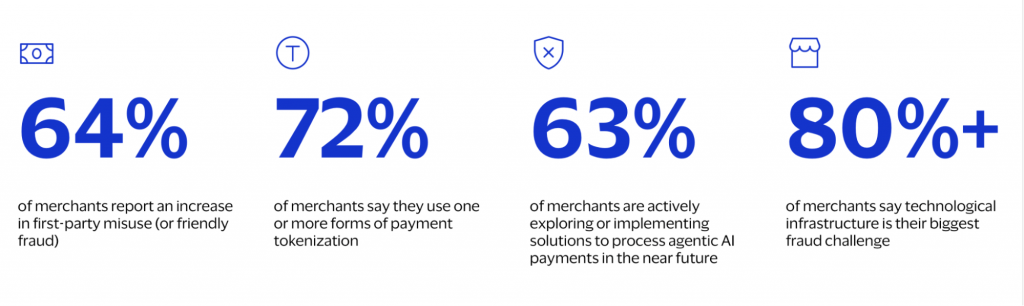
The financial impact extends beyond lost traffic to include reduced sales during outages and higher operational costs. Around 64% of merchants report an increase in friendly fraud and chargeback abuse, while 72% already use payment tokenization to improve transaction security.
As AI-powered eCommerce grows, 63% of merchants are also exploring solutions for agentic AI payments. This makes stronger security and fraud prevention even more important for protecting revenue and customer trust.
Also Read: Importance of SEO For eCommerce Website
Best Security Measures Every eCommerce Website Needs
Most eCommerce security problems don’t happen because a business forgot one tool. They happen because security is treated as a one-time setup rather than an ongoing process.
Modern online stores rely on payment systems, plugins, APIs, cloud hosting, third-party apps, and customer accounts…all working together. Every connection creates another possible entry point for attackers. That’s why strong eCommerce security comes from layered protection. Not just a single solution!
The goal here isn’t just to block attacks. It’s to protect customer trust. It’s to keep the store running smoothly. And more importantly, it’s to reduce damage if something does go wrong.
That said, here are the security measures that matter most in real-world eCommerce operations:
1. Use HTTPS and Advanced SSL Certificates
HTTPS protects customer data during account activity by encrypting information sent between users and your website.
You need the best SSL for your eCommerce website as it builds trust. Customers are far more likely to leave a store if they see browser warnings or signs that a website may not be secure.
Case in point:
A mistake many businesses make is letting SSL certificates expire during website migrations and/or hosting changes. Even a few hours of certificate errors during a busy sales period can hurt conversions and customer confidence.
Also Read: Know the 9 Types of SSL Certificates
2. Enable a Web Application Firewall (WAF)
A WAF filters harmful traffic before it reaches your website. It helps block common attacks like:
- ➜ SQL injections
- ➜ Cross-site scripting (XSS)
- ➜ Malicious bot activity
This becomes especially important during big sales events when attackers often target high-traffic stores.
For Example:
During flash sales, some stores experience bot attacks where automated systems repeatedly hit checkout pages to overload servers or abuse discount codes. A properly configured WAF can identify and block that traffic before it affects real customers.
3. Implement multi-factor authentication (MFA)
Passwords alone are no longer enough. Stolen credentials and phishing attacks are extremely common in eCommerce.
MFA adds another layer of protection…especially for admin accounts. Many businesses are also moving toward passkeys and passwordless logins. Why? Because they reduce phishing risks while making login faster for users.
For instance, one overlooked issue is shared admin accounts.
If multiple employees use the same login, it becomes almost impossible to properly track suspicious activity. It’s hard to limit damage after an employee leaves the company.
Also Read: Web Development Industry Statistics
4. Protecting Admin Accounts and Controlling Access
Admin accounts are one of the biggest targets for attackers. Why? Because they provide access to customer data and payment systems.
Strong protection includes:
- ➜ Limiting who gets admin access
- ➜ Using unique passwords
- ➜ Enabling MFA
- ➜ Monitoring login activity
- ➜ Removing old or unused accounts quickly
Role-based access control (RBAC) is also vital. Because employees should access only the systems they need.
Take this as an example:
A customer support employee usually doesn’t need access to payment configurations or backend server settings. Limiting permissions reduces the damage if an account gets compromised.
5. Keep Plugins and Integrations Secure and Up to Date
Plugins and third-party integrations are one of the most common sources of security problems.
Many breaches happen because businesses forget to update old plugins or keep unnecessary integrations connected for too long.
A good rule is simple: if a plugin is outdated or unsupported, remove it.
In many real-world cases, attackers don’t target the store itself first. They target vulnerable plugins with known security flaws because those are easier entry points.
6. Secure Your APIs to Protect Sensitive Business Data
APIs connect your store with payment tools, shipping platforms, mobile apps, and other systems. If they aren’t secured properly, they can expose sensitive customer or business data.
Strong API protection includes:
- ➜ Authentication
- ➜ Rate limiting
- ➜ Encrypted connections
- ➜ Monitoring for unusual activity
For example:
Poorly secured inventory APIs can sometimes expose stock levels, pricing logic, or customer order information without businesses realizing it.
7. Detect Threats That Traditional Security Tools Might Miss
Modern attacks often look like normal user activity at first. That’s why behavior monitoring matters!
Good monitoring systems can detect things like:
- ➜ Logins from unusual locations
- ➜ Sudden account changes
- ➜ Suspicious checkout activity
- ➜ High-speed bot traffic
- ➜ Unauthorized access attempts
Catching these signs early can prevent much larger problems later.
For instance:
If a customer account suddenly logs in from another country and immediately changes shipping information before placing expensive orders, that’s often a strong sign of account takeover fraud.
Also Read: How You Can Find Bugs in Websites Manually?
8. Protecting Your Business with Secure Backups
Even secure businesses can experience cyberattacks. Not to mention hosting failures and/or accidental data loss.
Automatic backups help stores recover quickly and reduce downtime. But backups only work if they’re tested regularly and stored securely away from production systems.
Some businesses learn too late that their backups were incomplete or corrupted. Even stored on the same compromised server.
9. Protect Customer Payments and Prevent Fraudulent Transactions
Secure payment gateways help protect customer payment information without storing sensitive card data directly on your website.
Many also include fraud detection, encryption, tokenization, and chargeback protection to reduce financial losses. For merchants looking to automate dispute recovery, a chargeback management solution like Chargesflow can automatically fight fraudulent chargebacks and recover lost revenue.
One practical example:
AI-based fraud tools flagging unusually large purchases placed from newly created accounts using mismatched billing and shipping addresses. Those small signals often help stop fraudulent orders before chargebacks happen.
Also Read: Which Functions are Important on a Website?
10. Use CDNs and DDoS Protection
Large traffic spikes can slow down or crash websites. Especially during promotions or seasonal sales.
CDNs and DDoS protection systems help absorb malicious traffic. While keeping the website stable for real customers.
Some attackers intentionally target stores during major campaigns. Why? Because even short downtime during peak traffic can lead to significant revenue loss.
11. Protect Stored Customer Data Through Encryption and Data Minimization
Protecting customer information shouldn’t stop after checkout. Stored customer data should also be encrypted to reduce the impact of potential breaches.
Businesses should also avoid keeping unnecessary sensitive data for longer than needed.
For example:
Many stores keep old customer records or outdated payment-related information long after it’s needed operationally. This increases exposure if a breach occurs.
Also Read: Important Things Business Websites Should Have
12. Remove unused plugins and integrations
Every extra plugin or third-party integration is essentially another potential entry point into your store.
In real audits, it’s common to find “forgotten” tools still active. Think old chat widgets, abandoned analytics scripts, outdated shipping plugins, and more.
For example:
A WooCommerce store I reviewed had a discontinued coupon plugin still installed. It hadn’t been updated in over two years and was flagged with a known vulnerability that allowed script injection. The store owner wasn’t even using it anymore—yet it was still live.
If a plugin isn’t actively supporting checkout or operations, remove it completely. Not just deactivate it!
13. Protect APIs with authentication layers
APIs are often where attackers look first. Why? Because they can quietly expose large amounts of structured data if misconfigured.
For instance:
An unsecured product API endpoint like /api/orders without authentication can allow bots to scrape order details or test random order IDs. In real-world cases, attackers automate this to extract customer emails and purchase histories.
Use token-based authentication (like OAuth or signed API keys). Likewise, enforce rate limits. Lastly, restrict endpoints by role. Internal APIs should never behave like public-facing ones.
Also Read: How Can You Make A Website Look More Professional?
14. Use secure payment gateways
A secure payment gateway ensures your store never directly handles sensitive card data. This drastically reduces compliance and breach risk.
For example:
When using a proper gateway such as Stripe or Adyen, card details are tokenized at checkout. Even if your website is compromised, attackers only get unusable tokens. Not raw credit card numbers!
That said, avoid custom-built payment flows unless absolutely necessary. Why? They almost always introduce unnecessary PCI risk.
15. Enable automatic backups
Website backups are not just for disaster recovery. They’re your fastest recovery path after ransomware, or plugin failure.
In practice: A daily backup schedule is often the minimum. High-traffic stores should also consider incremental backups every few hours.
A common scenario:
A failed plugin update breaks the checkout page right before a weekend sale. Stores with automated backups can roll back in minutes. Those without often lose thousands in revenue while troubleshooting.
16. Encrypt customer data
Encryption ensures that even if attackers access your database, the information is unreadable without decryption keys. This matters most for stored data like customer profiles and order histories.
For example: A compromised admin panel should never expose plain-text passwords or billing addresses.
That said, use strong encryption standards (like AES-256 at rest). Make sure that sensitive fields are hashed or tokenized where possible.
17. Set up malware monitoring
Malware often doesn’t announce itself. It hides in modified theme files, injected scripts, or unauthorized admin accounts.
A practical example:
Attackers are injecting a single line of JavaScript into a footer file to skim checkout form data. The site continues to function normally. So, the breach can go unnoticed for weeks.
Continuous scanning tools that compare file integrity and detect unusual changes are far more effective than manual checks.
18.Enable real-time threat detection
Unlike periodic scans, real-time detection reacts while the attack is happening.
For example:
If a bot starts attempting thousands of login requests per minute, a real-time system can block the IP and trigger CAPTCHA. Or even temporarily lock the endpoint before credentials are compromised.
This is especially important for stores with high traffic. Where brute-force attempts are constant but often subtle.
19. Use secure hosting infrastructure
Your hosting environment determines how resilient your store is. At the foundation level.
Choose a hosting provider that is a properly secured host, which should include WAF, isolated account environments, automatic patching, and DDoS mitigation. Without these, even a well-built store can be taken down by infrastructure-level attacks.
In practice:
Shared hosting without isolation is one of the most common weak points in small eCommerce setups.

Protect your customer data, transactions & operations with enterprise-grade security.
Also Read: Is Free Web Hosting Still Worth It Today?
20. Configure CDN and DDoS protection
A CDN does more than speed up your site. It also acts as a buffer between your server and malicious traffic.
For example:
During a DDoS attack, instead of hitting your origin server directly, traffic is absorbed and filtered at the edge network. This keeps your store online even under heavy abuse.
Proper configuration also includes bot filtering rules and rate limiting at the edge.
21. Implement fraud prevention tools
Fraud isn’t always obvious. It often looks like normal transactions until chargebacks appear weeks later.
For instance:
Fraudsters may test stolen cards with low-value purchases before making larger ones. AI-based fraud tools can flag unusual patterns like mismatched billing locations or repeated failed attempts.
The goal isn’t just blocking fraud. It’s reducing false positives so legitimate customers aren’t interrupted.
22. Secure customer accounts and digital wallets
Customer accounts are often the weakest link. Why? Because attackers don’t need to break your system. Just reuse leaked passwords from other sites.
A real-world pattern: Credential stuffing attacks.
Bots try thousands of known email/password combinations until they find matches.
Mitigate this with multi-factor authentication and password breach detection. Likewise, employ login anomaly monitoring (like alerts for new devices or unusual locations).
Also Read: Top Technical Requirements For Your eCommerce Websites
Bonus Tips to Improve eCommerce Website Security
Basic security measures are important. However, extra layers of protection can further reduce risk and strengthen customer trust.
Small improvements in monitoring, access control, and fraud prevention can make a major difference over time.
These additional practices help eCommerce websites stay more resilient against modern threats:
- ★ Add CAPTCHA intelligently without hurting UX. Use CAPTCHA only where needed to block bots while keeping the checkout and login experience smooth for real users.
- ★ Create a security-first checkout process. Design your checkout flow to minimize data exposure and reduce opportunities for fraud or manipulation.
- ★ Hide sensitive admin URLs. Change default admin paths to make it harder for attackers to locate login pages.
- ★ Use security headers properly. Add HTTP security headers to protect your site from common attacks like XSS and clickjacking.
- ★ Content Security Policy (CSP). CSP helps control which scripts and resources can load on your site, reducing the risk of malicious code injection.
- ★ Use HSTS. HSTS forces browsers to use secure HTTPS connections, preventing downgrade attacks.
- ★ X-Frame-Options. This prevents your website from being embedded in other sites, helping stop clickjacking attacks.
- ★ Audit third-party apps regularly. Regularly review installed plugins and integrations to ensure they are safe, updated, and still needed.
- ★ Train your internal team against phishing. Educate staff to recognize phishing attempts and avoid accidentally giving attackers access.
- ★ Restrict admin access by IP. Limit admin panel access to trusted IP addresses to reduce unauthorized login attempts.
- ★ Monitor fake coupons and promotion abuse. Track unusual discount usage patterns to prevent fraud and revenue loss from abused promotions.
- ★ Set up security alerts and logs. Enable logging and real-time alerts so suspicious activity can be detected and responded to quickly.
- ★ Use device intelligence for fraud detection. Analyze device behavior and fingerprints to identify suspicious users or repeated fraud attempts.
- ★ Build a disaster recovery plan. Prepare a clear plan to restore your website quickly after a data breach or loss.
- ★ Perform regular penetration testing. Simulate real attacks to identify vulnerabilities before hackers can exploit them.
- ★ Monitor dark web mentions of your brand. Track leaked data or brand misuse on the dark web to respond quickly to potential threats.
- ★ Use AI-powered threat monitoring tools. Leverage AI tools to detect patterns and anomalies faster than manual monitoring.
Also Read: Best Practices to Secure Your Website
Security Best Practices for Popular eCommerce Platforms
Different eCommerce platforms come with different security strengths and risks. While many platforms include built-in protections, businesses still need to properly secure plugins, integrations, APIs, and user access.
Following platform-specific best practices helps reduce vulnerabilities and improve overall store security:
1. Shopify security best practices

- ➢ Enable multi-factor authentication (MFA) for all admin accounts.
- ➢ Only install trusted apps from reputable developers.
- ➢ Review staff permissions regularly and remove unused accounts.
- ➢ Monitor login activity and unusual store behavior.
- ➢ Use fraud analysis and Shopify’s built-in security tools.
2. WooCommerce security best practices

- ➢ Keep WordPress, plugins, and themes updated at all times.
- ➢ Use a trusted security plugin and Web Application Firewall (WAF).
- ➢ Remove unused plugins and inactive themes.
- ➢ Limit admin access and strengthen login protection on website.
- ➢ Choose secure hosting optimized for WordPress and WooCommerce.
For comprehensive guidance on building and securing WooCommerce stores from the ground up, refer to the eCommerce Software Development Guide to understand best practices for architecture, security implementation, and scalability.
3. Magento/Adobe eCommerce security tips

- ➢ Apply security patches and updates immediately after release.
- ➢ Enable MFA for admin users and restrict backend access.
- ➢ Use secure hosting with advanced server-level protection.
- ➢ Audit extensions regularly for vulnerabilities.
- ➢ Monitor logs and suspicious activity continuously.
4. Headless commerce security strategies
- ➢ Secure APIs with authentication, rate limiting, and encryption.
- ➢ Protect frontend applications from exposed endpoints.
- ➢ Monitor third-party integrations carefully.
- ➢ Use Zero Trust principles across connected systems.
- ➢ Validate and sanitize all API requests and responses.
5. API-first architecture protection
- ➢ Require authentication and authorization for every API request.
- ➢ Use API gateways to manage traffic and security policies.
- ➢ Encrypt data transferred between services and applications.
- ➢ Monitor APIs for abuse, scraping, and unusual activity.
- ➢ Regularly test endpoints for vulnerabilities and misconfigurations.
Also Read: How Much Does it Cost For Website Maintenance?
AI & eCommerce Security: what’s changing in 2026
AI is reshaping eCommerce on both the customer and attacker side. AI shoppers, automated buying agents, and even bulk purchasing tools used for products are creating new security challenges that many online stores were not designed to handle. At the same time, AI bots are increasingly being used to automate purchases and abuse checkout systems at scale.
AI-generated fake reviews and fake online stores are also becoming more convincing and harder to detect. Attackers now use AI to imitate customer behavior, spoof support systems, and create scams that look legitimate across everything from niche fashion items to everyday products like blank apparel, making fraud harder to spot for both businesses and shoppers.
As these threats grow, AI-powered fraud detection is becoming essential for modern eCommerce security. Businesses also need to carefully monitor risks tied to AI chatbots and conversational commerce, since attackers can manipulate or impersonate these systems to steal information or mislead users during the buying process.
Future of eCommerce security beyond 2026
eCommerce security will continue evolving as online stores become more automated and AI-driven. Future security strategies will focus less on reactive protection. They will prioritize continuous verification, intelligent monitoring, and identity-based security.
Businesses that adapt early will be better positioned to protect both customer trust and long-term growth. Here are the eCommerce security trends to keep up with:
- ➜ Zero Trust becoming the default model: Zero Trust means no user and/or device is trusted by default (even inside the network). Every request must be verified continuously to help reduce insider threats and unauthorized access.
- ➜ Passwordless authentication replacing passwords: More businesses are adopting passkeys and passwordless login systems. The goal is to remove weak password risks and reduce phishing and credential-stuffing attacks.
- ➜ Biometric verification trends: Fingerprint scans and facial recognition are becoming more common because they are harder to steal or replicate than traditional passwords.
- ➜ AI vs AI cybersecurity battle: Both attackers and defenders are using AI tools. This means security systems must now detect and respond to AI-generated attacks in real time.
- ➜ Quantum-resistant encryption discussions: As quantum computing develops, businesses are exploring new encryption methods designed to protect data from future decryption threats.
- ➜ Real-time behavioral authentication: Systems are starting to monitor user behavior continuously, such as typing patterns and navigation habits, to detect suspicious activity.
- ➜ Device fingerprinting and fraud intelligence: Businesses are using device data and location signals to identify risky users and prevent fraud more accurately.
- ➜ Privacy regulations becoming stricter globally: Governments are introducing stronger data protection laws worldwide. These laws require businesses to improve how they collect and process customer data.
Also Read: Which Technology is Best For Website Development?
How Host IT Smart Can Be the Best Hosting Option for Your eCommerce Sites?
For eCommerce businesses seeking a balance between performance and security, Host IT Smart offers several features that align well with modern online store requirements. The platform provides:
- NVMe SSD storage
- SSL support, backups
- VPS and dedicated hosting options
- Global server infrastructure
- 24/7 support
All these can help improve website speed, uptime, and security for growing eCommerce stores.
In addition, it offers specialized eCommerce hosting plans and scalable infrastructure designed to support high traffic and payment processing. And yes, business growth!
Conclusion
Security in eCommerce is no longer just about preventing attacks. It’s part of how businesses grow. A secure store builds confidence, and confidence drives conversions.
Being proactive with security helps businesses stay ahead of threats instead of reacting after damage is done. Regular updates and layered protection reduce risk and improve stability.
At its core, eCommerce security is about protecting trust and revenue at the same time. When customers feel safe, they are far more likely to complete a purchase and come back again.
Frequently Asked Questions (FAQs)
AI-powered attacks, such as automated phishing and account takeover attempts, are becoming the biggest threat. They are harder to detect and easier to scale than traditional attacks.
Yes, small eCommerce sites are often targeted because they usually have weaker security. Attackers don’t only go after big brands anymore.
eCommerce sites handle sensitive customer data and payments. This makes them high-value targets. Extra security features help reduce fraud and breaches.
Start with basics like strong authentication and regular updates. Then add layers like firewalls and fraud prevention tools.
Common tools include WAFs, malware scanners, bot protection systems, and fraud detection tools. Many stores also use monitoring and backup solutions.
Risks include data breaches, payment fraud, account takeovers, and malware infections. API abuse and plugin vulnerabilities are also common entry points.
At a minimum, security audits should be done quarterly. High-traffic or fast-changing stores may need them more frequently.
MFA adds an extra layer of protection beyond passwords. It helps prevent unauthorized access even if login details are stolen.
Passkeys replace passwords with secure device-based and/or biometric login methods. They reduce the risk of phishing and credential theft.
APIs can expose sensitive data if not properly secured or authenticated. Attackers often target weak and unprotected endpoints.
Secure hosting can provide built-in protections like firewalls and DDoS mitigation. It also helps ensure system updates and monitoring are in place.
AI can detect unusual behavior patterns and flag suspicious transactions in real time. It helps identify fraud faster than manual monitoring.
A hacked site can suffer downtime and data leaks, resulting in lost sales. It can also damage customer trust and lead to long-term revenue loss.
Small businesses are frequent targets because they often have fewer defenses. Strong security helps protect revenue and build customer trust early.