| Getting your Trinity Audio player ready... |
Highlights
- OpenAI’s ChatGPT and Anthropic’s Claude are top free AI tools for content writing, brainstorming, and campaign planning.
- Copy.ai, Canva AI, and Leonardo.Ai help marketers create copy, graphics, ads, and visuals faster.
- Perplexity AI improves research, trend discovery, and quick information gathering for marketers.
- CapCut and Runway simplify video editing, short-form content, and AI-powered video production.
- Google Analytics GA4 and n8n help marketers track performance and automate repetitive marketing tasks for free.
Introduction
The gap between marketers who are winning right now and those who are struggling isn’t budget. It isn’t team size. It isn’t even experience.
It’s tools. And not those expensive ones that burn a hole in your pocket!
But the right ones. The ones that are genuinely worth your time and have generous free plans.
Because the landscape in 2026 looks nothing like it did two years ago. The best free AI tools for digital marketing today can write long-form content that actually sounds human, generate campaign visuals in seconds, turn a single blog post into a week’s worth of social content, and automate entire marketing workflows, all without spending a rupee.
But with hundreds of tools claiming to be the best free AI tool for online marketing, the real skill isn’t using AI. It’s knowing which tools to use, for which tasks, and why.
That’s the entire point of this guide.
We’ve done the research, verified the data, and filtered out everything that overpromises and underdelivers. What’s left is a hand-picked list of top free AI tools for marketers, organised by category, backed by real usage statistics, and reviewed by actual digital marketers.
If you’ve been searching for free AI tools for digital marketing in 2026 that genuinely move the needle, you just found them.
How We Selected These Free AI Tools for Digital Marketing
Not every “free” tool deserves a spot on this list. Here’s exactly what we looked for before including any free AI tools for marketing:
➢ Actually Free: The free plan had to offer real, usable functionality, not just a 3-day trial dressed up as “free forever.”
➢ Marketing-relevant: The tool had to serve a clear purpose in a digital marketing workflow, content, visuals, SEO, analytics, video, or automation.
➢ Beginner-accessible: If a non-technical marketer can’t figure it out within 20 minutes, it didn’t make the cut in our list of free AI tools for online marketing.
➢ Real-world Feedback: We’ve verified every tool’s claim with actual usage data, platform statistics, and reviews from real users.
➢ Actively Maintained: A free tool that hasn’t been updated in 18 months is a liability, not an asset. Every free AI tool for digital marketing on this list is actively developed, regularly improved, and backed by an expert team.
➢ Proven at Scale: We didn’t include tools with a handful of reviews and a flashy landing page. Every tool here has a verifiable user base, real adoption numbers, real ratings, and real traction among working marketers.
Also Read: 15 Best SEO Audit Tools For Your Website (Free+Paid)
The Only Free AI Tools for Digital Marketers to Know About!
1. For Content Creation & Copywriting
Great content is the foundation of digital marketing. These free AI tools for digital marketing make it faster, easier, and far less stressful to write copy that genuinely connects.
1.1. ChatGPT (Free Plan)
ChatGPT is a conversational AI that can write, brainstorm, edit, summarise, and explain virtually anything you ask it to. The free plan gives you access to GPT-4o, more than capable for everyday marketing tasks like writing captions, drafting emails, generating campaign ideas, and building content calendars from scratch.
➢ Why It’s Actually Useful
Need a caption for Instagram? A product description? An email subject line? Five blog ideas in 30 seconds? ChatGPT handles all of it. It understands context, adapts to your tone, and iterates rapidly based on your feedback.
★ Pro Tip:
Build a reusable “marketing prompt starter” and save it in a document. Include your brand name, tone, target audience, and one competitor you don’t want to sound like. Paste it at the top of every new ChatGPT session, and your output will be consistently on-brand without re-explaining yourself every single time.
➢ Audience Feedback
ChatGPT has a 4.9/5 rating on the iOS App Store from 803,700 reviews, and 4.6/5 on Google Play from 573,000 reviews. 77% of marketers use ChatGPT, with 85% reporting accelerated content production.
“A new client wanted a full 3-month marketing plan in just 2 days; it was an impossible deadline. I used ChatGPT to create the basic structure of the plan, draft some social media posts, and generate ideas for blog content. It did 40% of my work in just a few hours.
I used my time to make the strategy better and add my unique ideas. We delivered the plan on time, and the client was happy”.
Verified Capterra Reviewer, Digital Marketing Professional (Capterra)
Also Read: How to Write Website Content Using ChatGPT?
1.2 Copy.ai (Free Plan)
Copy.ai is built specifically for marketing copy. Unlike general-purpose AI tools, it comes loaded with pre-built templates for ads, social posts, product descriptions, email campaigns, and landing pages. The free plan gives you access to a solid set of these templates with a monthly usage limit.
➢ Why It’s Actually Useful
Copy.ai thinks like a marketer, and its templates are structured around conversion. It helps with Meta ad writing, Google ad writing, and persuasive writing as a whole, which provides you with a headline, body copy, and CTA that actually follow advertising best practices.
★ Pro Tip
Don’t just use the default templates. Go into Copy.ai’s Brand Voice feature and train it on three to five examples of your best-performing copy. Once it knows your style, every output will sound far more native to your brand and need significantly less editing before it’s ready to publish.
➢ Audience Feedback
Copy.ai holds a 4.8/5 rating from 3,000+ G2 reviews, with the most common praise being fast generation, an easy-to-use interface, and useful templates for short-form content.
“CopyAI is a marketing writer’s dream. It’s like having a ghostwriter, but without the expense and hassle of hiring and managing someone else to write your content. The AI is so good, it really feels like the work of another human being. You get to see all their writing suggestions, so you can be sure that what they’re recommending is on-brand and hitting the right tone.”
Sangeetha A., Verified Reviewer
Also Read: How to Write a Technical Blog?
1.3 Claude (Free Plan)
Claude by Anthropic is another one of the best conversational AI assistants known for producing thoughtful, nuanced, and well-structured writing and research.
The free plan gives access to Claude Sonnet, a highly capable model that particularly excels at long-form content, research assistance, editing existing copy, and maintaining brand voice consistency across multiple pieces.
➢ Why It’s Actually Useful
Where Claude really stands out among top free AI tools for marketers is in depth and tone. It handles complex instructions well, adapts to your brand voice when you give it examples, and produces content that’s genuinely readable and engaging.
It’s also excellent for summarising research, drafting strategy documents, and editing your existing content without stripping out your original voice.
★ Pro Tip
Use Claude’s Projects feature to create a dedicated workspace for each client or brand. Upload the brand guidelines, tone reference, and two or three examples of top-performing content into the project. Claude carries that context into every conversation automatically, so every piece you generate is already aligned.
➢ Audience Feedback
Claude has 18.9 million monthly active users, with over 300,000 business customers, and is embedded in tools used by over 70% of Fortune 100 companies.
I can use Claude’s output with minimal editing about 80% of the time. For brand voice matching, Claude wins by a mile. Freelancers managing multiple clients with different brand voices will love how well it follows instructions.”
James Dickerson, Marketing Strategist & Founder, The Vibe Marketer, based on testing with 2,600+ marketers
Also Read: What Should You Consider When Developing Website Content?
2. For Research & SEO Content Planning
SEO doesn’t have to be complicated or expensive. These free AI tools for digital marketing give you the research and planning intelligence to rank, no premium subscription required.
2.1 Perplexity AI
Perplexity AI is an AI-powered search engine that answers questions with cited, real-time sources from the web. It is a smarter, more transparent alternative to a regular Google search; it doesn’t just find links, it synthesises the information and tells you exactly where each piece came from.
For content marketers, it’s become one of the most valuable free marketing tools for research-heavy work.
➢ Why It’s Actually Useful
Instead of opening 15 browser tabs to understand a topic, you ask Perplexity and get a clear, sourced summary in seconds. It’s excellent for finding content angles, understanding what’s trending in your niche, identifying what competitors are writing about, and doing quick-turnaround research without a paid SEO tool.
★ Pro Tip
When planning a new blog or campaign, ask Perplexity: “What are the most common questions people ask about [your topic] in 2026?” It pulls real, cited, current data, giving you a ready-made FAQ section, content angle ideas, and semantic keywords all in one response.
➢ Audience Feedback
Perplexity AI has over 45 million monthly active users, with the iOS app holding a 4.8/5 rating from over 500,000 App Store reviews, and 4.6 stars from 1.79 million Google Play reviews.
“Perplexity is my go-to for understanding what’s being said about a topic right now. The citations make it trustworthy in a way that other AI tools simply aren’t.”
Verified G2 Reviewer, Content Strategist
Also Read: How to Make an SEO-Friendly Website?
2.2 Google Keyword Planner / Search Console (with AI Insights)
Google Keyword Planner helps you find keyword ideas, search volumes, and competition levels. Google Search Console shows you how your existing website performs in search, which pages rank, which queries bring traffic, and where opportunities lie.
Both now incorporate AI-powered suggestions and insights that surface actionable data without manually searching through raw reports.
➢ Why It’s Actually Useful
For SEO, these two free marketing tools together give you an enormous amount of intelligence at zero cost. Keyword Planner helps you plan new content around what people are actually searching for.
Search Console tells you what’s already working so you can double down on it. When combined, they’re the most important free AI tools for digital marketing for building sustainable organic growth.
★ Pro Tip
In Search Console, filter your queries by pages ranking in positions 8 to 15. These are your almost-there pages’ content that Google likes but hasn’t fully promoted yet. Optimized those pages with updated information, internal links, and improved their meta titles for ranking improvements rather than writing brand-new content from scratch.
➢ Audience Feedback
Google Search Console is used by over 30 million websites globally and is the most widely deployed free SEO tool in the world.
“I kept paying for an SEO tool until I realised Google’s own free tools were giving me 90% of the same data. Search Console and Keyword Planner are my first stops for any content planning now.
Verified G2 Reviewer, SEO Specialist, Small Business
2.3 Google Trends
Google Trends is a free tool by Google that tracks real-time and historical search interest for any keyword, topic, or industry across different regions and time periods.
It shows you how search interest rises and falls over time, which regions are searching the most, and what related topics and queries are gaining momentum, making it one of the most underused free marketing tools for content planning and campaign timing.
➢ Why It’s Actually Useful
Most marketers plan content based on what they think people are interested in. Google Trends shows you what people are actually searching for and when. You can spot a trending topic with fresh keywords before it peaks, compare two keywords, and find rising queries in your niche.
It fills the gap, providing real-time trend intelligence that makes your content calendar smarter.
★ Pro Tip
Before finalising your content calendar for the month, run your top five planned topics through Google Trends and check the interest curve for the past 12 months. If a topic peaks in a specific month every year, schedule your content two to three weeks before that peak.
By the time your audience is actively searching, your content is already indexed, ranked, and waiting for them.
➢ Audience Feedback
“Google Trends is one of the most underrated free tools in any marketer’s arsenal. I use it every single month to plan content around seasonal demand, and it consistently helps me publish at exactly the right time.” —
Verified G2 Reviewer, Content Marketing Manager, Marketing & Advertising
Also Read: How Many Keywords Can A Website Use For SEO
3. For Visual Content Creation
Your visuals speak before your words do. These free AI tools for marketing help you create scroll-stopping graphics and imagery without any expert design skills.
3.1 Gemini (Google)
Google’s Gemini is a multimodal AI that generates images, assists with visual brainstorming, and creates marketing assets directly from text prompts. It’s available free through Google’s ecosystem and is deeply integrated with Google Workspace tools, working inside Docs, Slides, and Gmail without needing a separate platform or account.
➢ Why It’s Actually Useful
Gemini’s image generation has improved significantly, and its tight integration with Google’s suite means you can go from a text description to a draft visual inside the tools you’re already using every day.
It’s also helpful for generating quick concept visuals for presentations, mockups, and ad creatives without opening a separate design tool.
★ Pro Tip
Before writing a single word of ad copy, drop your product description into Gemini and ask it to generate a visual of your ideal customer using the product. Use that image as your creative anchor, write your headlines, captions, and CTAs around what you see.
Your copy and visuals will feel cohesive from the start because they were built from the same reference point.
➢ Audience Feedback
Gemini has over 350 million monthly active users across Google’s ecosystem as of early 2026.
“Gemini inside Google Slides has genuinely changed how I put together presentations. I describe the visual I need, and it generates it in context. Saves enormous time every week.”
Verified Product Hunt Reviewer, Brand Manager
3.2 Canva AI (Magic Studio)
Canva needs no introduction as a design platform, but its AI suite, Magic Studio, takes it to a new level entirely. Features include AI image generation, Magic Write (an in-built copy assistant), background remover, Magic Edit (change specific elements in photos), and text-to-design templates.
Most of these are available on the free plan with usage limits, making it one of the most complete free marketing tools for visual content creation available today.
➢ Why It’s Actually Useful
Canva AI means non-designers can create genuinely professional-looking social media graphics, presentations, thumbnails, and marketing materials without touching expensive software. You can generate a graphic from a text prompt, instantly resize it for different platforms, and write the caption — all within one tool.
★ Pro Tip
Set up a Brand Kit in Canva (available on the free plan with limitations) with your exact brand colours, fonts, and logo. Every time you create a new design, apply the Brand Kit first. This single step eliminates the most common consistency problem marketers face.
➢ Audience Feedback
Canva has 260 million active monthly users with a whopping 3 million reviews on G2.
“It is a user-friendly drag-and-drop interface, a vast library of free templates and elements, and features that empower beginners to create professional-looking graphics easily, making design accessible for social media.”
Verified LinkedIn User, System Analyst, Computer Software
3.3 Adobe Firefly (Adobe Express Free)
Adobe Firefly is Adobe’s generative AI image model, available free through Adobe Express. It generates high-quality, commercially safe images from text prompts, trained entirely on licensed content, which means the images you create can be used in marketing materials and client work without copyright concerns.
➢ Why It’s Actually Useful
Firefly is specifically designed for commercial use, which matters when you’re creating assets for a business or clients. The quality is excellent, especially for product-adjacent imagery, lifestyle visuals, and branded backgrounds. Firefly has generated over 13 billion images since launch, and it sits inside Adobe Express templates, so you generate and design in the same place without switching tabs.
★ Pro Tip
When generating images in Firefly, add lighting and mood descriptors to your prompt: “soft studio lighting,” “golden hour warmth,” “clean white background with dramatic shadows.” These small additions push the output quality closer to professional photography and reduce the amount of editing needed.
➢ Audience Feedback
Adobe Express has over 35 million users globally and has a 4.4/5 rating on G2 from over 200 verified reviews.
“Firefly is incredibly useful for creating on-brand visuals quickly. The fact that images are commercial, it has relieved me as I deal with clients who have strict policies in place for copyrights and such problems. It’s become a core part of my design workflow.”
Verified G2 Reviewer, Graphic Designer, Marketing & Advertising (G2)
3.4 Leonardo AI
Leonardo AI is a powerful AI image and art generation platform with a genuinely generous free tier of 150 tokens per day. It specialises in high-quality, stylistically consistent imagery and offers fine-grained controls over style, resolution, and composition that go well beyond what most free AI tools for marketing in this category provide.
➢ Why It’s Actually Useful
If you need a consistent visual identity across your content, same style, same colour palette, same character look, Leonardo’s model training features are remarkable. For brands that rely heavily on custom visuals, it is the best free AI tool for digital marketing in 2026 that delivers near-professional output at zero cost.
★ Pro Tip
Create a “style preset” by generating three to five images you love, then use Leonardo’s Image to Image feature to lock in that visual style. Every subsequent generation will reference your preset, giving you a consistent brand aesthetic across your entire content library.
➢ Audience Feedback
Leonardo AI has over 19 million registered users and has generated over 1 billion images to date. It holds a 4.5/5 rating on Product Hunt from 200+ reviews.
“Leonardo AI produces studio-quality images that are leagues ahead of other free tools. The ability to maintain visual style consistency across multiple generations is something I haven’t found anywhere else; it’s completely changed how I produce campaign visuals.”
Verified Product Hunt Reviewer, Brand & Content Marketer
3.5 ChatGPT Image Generation (DALL·E / GPT-4o)
ChatGPT’s built-in image generation, powered by DALL·E and GPT-4o’s native image capabilities, lets you create visuals directly within your conversation. You describe an image, generate it, ask for refinements in plain English, and get the designs the way you want.
➢ Why It’s Actually Useful
The real magic here is the speed of iteration. You’re already in ChatGPT writing your caption, and you can immediately say “now create an image to go with this”, then refine it conversationally: “make it brighter,” “remove the text,” “add a product in the foreground.”
This makes it one of the most workflow-friendly free AI tools for marketing available right now.
★ Pro Tip
When briefing a designer or content team, use ChatGPT image generation to create a visual reference first. Describe the mood, layout, colour palette, and style you want, generate it in seconds, and share it as a creative brief.
You eliminate the back-and-forth, and your team gets a clear visual direction from day one, and your production budget goes toward execution, not interpretation.
➢ Audience Feedback
According to OpenAI’s Brad Lightcap, over 130 million users generated more than 700 million images in just the first week after the upgraded image generator launched in March 2025, making it one of the fastest product adoption moments in OpenAI’s history.
“After two weeks of pushing this tool to its limits, I’ve replaced several design expenses in my business. I generated an entire month’s worth of LinkedIn posts for my consulting business. And it also helps with my marketing copy, business strategy, and customer emails can now visualise ideas instantly without missing a beat.”
Timothy Biondollo, Small Business Owner & Marketing Consultant
Also Read: How to Get Images For Your eCommerce Website?
4. Tagshop AI
Tagshop AI is an AI-powered UGC video and ad creation platform that helps brands generate high-converting marketing videos without hiring creators, filming content, or spending hours editing. Simply describe your product, paste a product URL, or upload existing assets, and Tagshop AI creates authentic UGC-style videos, AI avatar videos, product ads, and social media creatives optimized for platforms like TikTok, Instagram, Facebook, and YouTube.
➢ Why It’s Actually Useful
Tagshop AI eliminates the biggest bottlenecks in video advertising—creator sourcing, script writing, filming, and editing. Instead of waiting days or weeks for content production, marketers can generate multiple ad variations in minutes.
Its AI Video Agent, AI Avatars, Voice Cloning, and Ad Clone capabilities make it especially valuable for ecommerce brands, DTC businesses, agencies, and marketers looking to scale video production while keeping costs low.
Whether you’re launching a new product, testing ad creatives, or creating content for multiple channels, Tagshop AI helps turn ideas into ready-to-publish videos faster than traditional workflows.
★ Pro Tip
Don’t start by creating just one ad.
Use Tagshop AI’s Ad Clone feature to analyze a winning competitor or reference ad, then generate multiple variations with different hooks, CTAs, and messaging angles. Launch several versions simultaneously and let performance data reveal the strongest creative.
This approach can dramatically reduce testing time and help you find winning ad concepts before investing heavily in production.
➢ Audience Feedback
Tagshop AI is quickly becoming a preferred solution for ecommerce brands, marketers, agencies, and content creators looking to produce creator-style video ads at scale without relying on traditional UGC production.
“We used to spend weeks coordinating with creators and editors for every campaign. With Tagshop AI, we generate multiple UGC ad variations in a single afternoon and launch tests almost immediately.”
Verified Ecommerce Marketing Manager
5. For Video & Short Content Creation
Short-form video is the biggest content opportunity in digital marketing right now. These free AI tools for digital marketing in 2026 make video creation accessible to every marketer.
5.1 Runway ML
Runway ML is a professional-grade AI video generation and editing platform that is used by creators at Universal, Warner Brothers, and Nike, and still has a free plan, making it one of the most powerful free marketing tools for video content creation available today.
With its free plan, you get access to Gen-3 video generation, including text-to-video and image-to-video alongside AI video editing features and background removal for video, all from a browser with no software download required.
➢ Why It’s Actually Useful
Video is the dominant content format in 2026, and creating quality video used to require cameras, editing skills, and expensive software. Runway changes all of that. You can generate short cinematic video clips, create product reveal videos from still photography, and edit footage using AI tools that would have cost thousands of dollars just a few years ago.
★ Pro Tip
For product marketing, upload a clean product photo on a white background and use Runway’s image-to-video feature with a motion prompt like “slow cinematic zoom with soft lighting.” The output mimics high-end commercial video production. Pair it with a CapCut edit and branded captions, and you have a professional-quality product ad for exactly zero dollars.
➢ Audience Feedback
Runway ML has raised over $237 million in funding and holds a 4.4/5 rating on G2 from over 80 verified reviews.
“Runway is the most powerful free video tool I’ve come across. It takes static product images and turns them into cinematic motion clips that would otherwise require a full production team. For anyone running lean marketing operations, it’s an absolute game-changer.”
Verified G2 Reviewer, Digital Marketing Manager, Small Business
5.2 PixVerse
PixVerse is an AI video generation tool that converts text prompts or images into short, cinematic video clips with impressive visual quality. It specialises in dynamic, stylised content, fluid motion, dramatic lighting, and visually engaging movement, making it well-suited for social media content.
➢ Why It’s Actually Useful
PixVerse generates particularly fluid, high-quality motion from still images, which is incredibly useful for product marketing and even social media marketing, where visual appeal is the key. And, the output quality consistently outperforms most free AI tools for digital marketing in the video category.
★ Pro Tip
Use PixVerse alongside your static product photography rather than instead of it. Generate three to five short video variations from the same product image using different motion styles, then A/B test them as paid social ads with a small budget.
The winning creative becomes your hero video, and you’ve found it without a single day of production.
➢ Audience Feedback
PixVerse has over 5 million registered users and holds a 4.7/5 rating on Product Hunt from 150+ reviews.
I’ve been making product videos with PixVerse for my Shopify store. The cinematic quality from still photos is something I never expected from a free tool. It’s genuinely game-changing for small businesses with no video budget. Verified Product Hunt Reviewer, E-commerce Marketer
5.3 Async Video Editor
Async is an AI-powered video editor that combines traditional editing with AI-assisted workflows in one browser-based workspace. You can trim clips, generate subtitles, remove filler words, enhance audio, resize videos for different platforms, and even make edits using natural language, making it easy to polish content without switching between multiple tools.
➢ Why It’s Actually Useful
Instead of juggling separate apps for editing, captioning, and repurposing, the editor brings these tasks together in a single workflow. It’s especially useful for turning long-form recordings into social-ready clips, creating multiple aspect ratios, and making quick revisions with AI assistance.
★ Pro Tip
Upload your long-form video, ask the editor to remove pauses, generate subtitles, and create vertical versions for Shorts, Reels, or TikTok. You can then fine-tune the results manually, giving you a polished first draft in minutes rather than starting from scratch.
➢ Audience Feedback
The editor is particularly popular among creators, marketers, and podcasters who want to speed up post-production without sacrificing control. Users frequently highlight the ability to combine AI-powered editing with manual adjustments, making it suitable for both quick social content and more polished video projects.
5.4 CapCut AI
CapCut is a video editing app available on mobile and desktop with a full suite of AI features built in, auto-captions, AI voiceovers, smart cut, background removal, text-to-video, and AI script generation. The free plan is extraordinarily generous, making it the most complete free tool for short-form video content creation available to marketers in 2026.
➢ Why It’s Actually Useful
For short-form video content across TikTok, Reels, and YouTube Shorts, CapCut is the most fully-featured free AI tool for digital marketing in the video category. The script-to-video feature takes a written brief and generates a fully edited video with stock footage, voiceover, and captions automatically.
★ Pro Tip
Use CapCut’s “Script to Video” feature to repurpose your existing blog posts into short-form video content. Paste in your blog introduction, select a visual style, and let it generate the video. Then swap out the stock footage for your own brand visuals. You’ll have a Reel, a TikTok, and a YouTube Short from a single piece of written content in under 15 minutes.
➢ Audience Feedback
CapCut had 323 million monthly active users as of July 2024 and has surpassed 1 billion Android downloads. It holds a 4.4-star rating on Google Play from over 9.67 million reviews.
CapCut’s AI captions have saved my team at least 5 hours a week. We create content for three social channels, and CapCut handles the entire production side on the free plan alone.”
Verified G2 Reviewer, Social Media Manager, Startup
Also Read: How SEO and SEM Work Together?
6. For Analytics & Marketing Optimisation
Data is the backbone of smart digital marketing. This free AI tool gives you everything you need to understand your audience and make better decisions, at no cost whatsoever.
6.1 Google Analytics (GA4)
Google Analytics 4 is the industry-standard free web analytics platform. It tracks who visits your website, where they come from, what they do on your site, and which campaigns are performing with AI-powered insights built directly into the platform that automatically surface anomalies, trends, and opportunities in your data without you having to go looking for them.
➢ Why It’s Actually Useful
You simply cannot market effectively without data, and GA4 gives you that data for free. The AI insights feature means you don’t have to manually monitor every metric; Google’s AI flags things like “traffic from organic search dropped 30% this week” or “your product page has an unusually high exit rate” automatically.
Predictive metrics, including purchase probability and churn probability, are available on the free plan, giving you audience intelligence that most paid platforms charge a significant premium for.
★ Pro Tip
Set up custom alerts in GA4 for your three most important metrics, and GA4 will email you the moment any of them move significantly. You’ll catch problems and opportunities in real time instead of discovering them a week later when the damage is already done.
➢ Audience Feedback
GA4 is used by over 30 million websites globally and is the most widely deployed free analytics platform in the world.
GA4’s AI anomaly detection is brilliant. It flagged a sudden drop in organic traffic that turned out to be a technical issue I had no idea about. Saved an entire campaign from underperforming.
Verified G2 Reviewer, Digital Marketing Manager, Mid-Market
6.2 Microsoft Clarity
Microsoft Clarity is a completely free behavioural analytics tool that shows you exactly how real visitors interact with your website through heatmaps, session recordings, and click tracking.
It records actual user sessions so you can watch where people scroll, where they click, where they get confused, and where they drop off, giving you the visual “why” behind every number your GA4 dashboard shows you.
➢ Why It’s Actually Useful
GA4 tells you what is happening on your website: traffic dropped, bounce rate is high, conversion rate is low. Microsoft Clarity tells you why it’s happening: users are rage-clicking a broken button, nobody is scrolling past the hero section, or your CTA is being completely ignored.
Without it, you’re making optimisation decisions based on numbers alone, without ever understanding the human behaviour behind them.
★ Pro Tip
Filter your Clarity session recordings by rage clicks; these are moments where a user clicks the same element repeatedly out of frustration. Every rage click is a broken experience that is quietly costing you conversions. Fix the top three rage click issues on your highest-traffic pages and watch your bounce rate drop without writing a single new piece of content or spending a rupee on ads.
➢ Audience Feedback
Clarity has completely changed how I approach website optimisation. Watching real session recordings showed me exactly why our landing page wasn’t converting, something no analytics dashboard ever told me. It’s now the first tool I install on every new client website.
Verified G2 Reviewer, Digital Marketing Consultant, Small Business
6.3 HubSpot CRM (Free Plan)
HubSpot’s free CRM tracks every interaction with your leads and customers, emails opened, pages visited, forms submitted, and deals in progress, and ties it directly back to your marketing activity.
The free plan includes contact management, email tracking, deal pipeline, live chat, and basic marketing analytics that connect your campaigns to real business outcomes.
➢ Why It’s Actually Useful
GA4 and Clarity tell you what’s happening on your website. HubSpot closes the loop by showing you what happens after someone converts, which leads to customers, which marketing channels drove the most revenue, and where prospects are dropping out of your funnel.
The free plan’s email tracking feature notifies you the moment a lead opens your email, clicks a link, or revisits your website, so you can follow up at exactly the right moment.
★ Pro Tip
Connect HubSpot CRM to your website contact form and set up a simple lead source tracking property. After 30 days, you’ll have clear data on which blog posts, landing pages, and campaigns are actually generating leads, and you can double down on what’s working with complete confidence.
➢ Audience Feedback
HubSpot’s free CRM completely changed how I report marketing results to clients. I can now show exactly which campaigns generated leads and which ones converted into revenue, not just traffic and impressions. It’s the tool that finally made my marketing measurable.
Verified G2 Reviewer, Digital Marketing Manager, Agency
Also Read: How to Benchmark Website Performance
7. For Automation & Workflow
Working smarter means automating the repetitive stuff. This free marketing tool lets you build powerful automations without writing a single line of code.
7.1 n8n (Free / Self-Hosted)
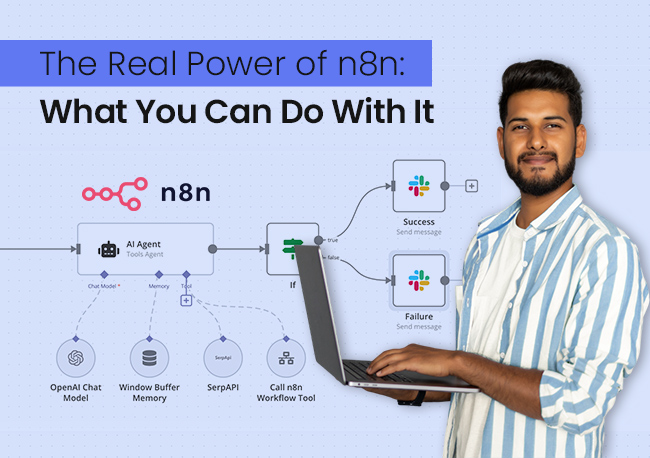
n8n is an open-source workflow automation tool like Zapier, but free and significantly more powerful. It connects apps, automates repetitive marketing tasks, and builds multi-step workflows with AI nodes built in. You can self-host it completely free or use the cloud version with a limited free tier, making it the highest-value free AI tool for online marketing in the automation category.
➢ Why It’s Actually Useful
Marketing involves a lot of repetitive, connective work: post this when that happens, save this lead here, send this email when someone does that. n8n automates all of it. It’s one of the most underrated free AI tools for marketing, especially for anyone managing multiple channels or clients simultaneously.
★ Pro Tip
Start with n8n’s “Lead Capture to CRM” template as your first automation. It connects your contact form, automatically enriches lead data, adds the contact to your CRM, and sends a personalised follow-up email, all without you touching it.
Once you see that working, you’ll immediately understand where else in your marketing workflow automation can save you hours every week.
➢ Audience Feedback
n8n has over 400,000 active users, 90,000+ GitHub stars, and holds a 4.7/5 rating on G2 from over 200 verified reviews.
n8n replaced three paid tools for me. I automated my lead follow-up, social scheduling, and weekly reporting all in one workflow. The learning curve is real but absolutely worth every minute.”
Verified G2 Reviewer, Growth Marketer
Also Read: How to Learn n8n the Smart Way
7.2 Lark (Free Plan)
Lark is an AI-powered workflow automation workspace designed to unify automation with everyday collaboration. It brings messaging, video conferencing, project management, and AI-powered workflows into a single digital workspace.
➢ Why It’s Actually Useful
For marketing teams tired of juggling disjointed software, Lark is a leading alternative among modern AI automation tools. Lark is an all-in-one digital platform designed to merge collaboration and automation seamlessly for business teams. It embeds workflow automation directly into messaging, documents, databases, and task execution, including built-in automation capabilities that allow users to trigger actions across chats, documents, and project boards for smarter workflows.
★ Pro Tip
Use Lark Base as a cloud-native relational database to structure your marketing calendar. Set a simple automation rule to instantly ping the responsible marketer in a chat group the moment a task status changes, eliminating manual follow-ups completely.
➢ Audience Feedback
Lark stands out as an all-in-one productivity powerhouse, providing users with a unified platform to manage projects effectively.
“Juggling different apps for chat, docs, and project tracking was causing serious app fatigue. Moving to Lark meant we could automate approvals and notifications natively inside our daily workspace, saving us hours every week.”
Verified G2 Reviewer, Marketing Operations Lead
7.3 Make (Free Plan)
Make (formerly Integromat) is a visual workflow automation platform that connects your apps, tools, and data sources into automated multi-step workflows through drag-and-drop canvas interface.
The free plan gives you 1,000 operations per month across unlimited scenarios, making it one of the most capable free marketing tools for automation without writing single line of code.
➢ Why It’s Actually Useful
Make’s visual canvas makes complex automations genuinely understandable. You can see exactly what your workflow is doing at every step, which makes building, debugging, and improving automations far more intuitive than text-based tools.
It integrates with over 1,500 apps, including Google Sheets, Mailchimp, Instagram, Slack, HubSpot, and more, meaning almost every tool in your marketing stack can be automated through a single free platform.
★ Pro Tip
Build a “content repurposing” automation in Make that triggers every time you publish a new blog post. Connect your CMS with Make, pull the blog title and URL automatically, generate a social media caption using the OpenAI integration, and post it to your LinkedIn and Facebook pages without touching anything manually.
One published blog post becomes three pieces of distributed content, entirely on autopilot.
➢ Audience Feedback
Make transformed how our agency handles client reporting. We built an automation that pulls campaign data from Google Ads, Facebook, and GA4 every Monday morning, formats it into a Google Slides report, and emails it to the client automatically. What used to take 3 hours now takes zero minutes.
Verified G2 Reviewer, Performance Marketing Manager, Digital Agency (G2)
7.4 Zapier (Free Plan)
Zapier is the world’s most widely used workflow automation platform, connecting over 7,000 apps through simple “if this, then that” automations called Zaps. The free plan gives you access to 100 tasks per month across five single-step Zaps, making it the most accessible entry point into marketing automation for anyone who has never automated a workflow before.
Why It’s Actually Useful
Zapier’s strength is its sheer breadth of integrations and the simplicity of its interface. For marketers who want to eliminate the most repetitive, time-consuming tasks in their workflow without learning a complex platform, Zapier’s free plan covers the most common automation needs beautifully.
New lead in your form?
Zapier adds them to your email list, notifies your team in Slack, and creates a CRM contact simultaneously without you lifting a finger.
★ Pro Tip
Start with one high-frequency automation rather than five low-frequency ones; you’ll feel the time saving within the first week and build confidence to expand your automation stack from there.
➢ Audience Feedback
Zapier has over 2.2 million users globally and holds a 4.5/5 rating on G2 from over 1,200 verified reviews, making it the most widely adopted free marketing tool for workflow automation.
“Zapier is the first automation tool I recommend to every marketer I work with. The free plan is enough to eliminate the most painful manual tasks in any marketing workflow, and the setup is so simple that there’s no excuse not to use it.
Verified G2 Reviewer, Digital Marketing Strategist, Freelance
Also Read: Benefits Of Email Marketing For Small Businesses In 2026
Expert Tips on Using Free AI Tools for Digital Marketing
Before you run off and sign up for all twelve tools, here’s what experienced marketers want you to know about making the most of free AI tools for digital marketing in 2026:
- ➢ Start with one tool, not twelve. The biggest mistake is signing up for everything at once and using nothing consistently. Pick one tool from each category, get comfortable with it, then expand.
- ➢ AI is your co-pilot, not your autopilot. The best results from any free AI tool for marketing come when a human is steering. Don’t publish the first draft; treat it as a starting point.
- ➢ Your prompt quality determines your output quality. “Write a caption” gives you something generic. “Write a casual, witty Instagram caption for a sustainable coffee brand promoting their oat milk blend, targeting environmentally conscious millennials” gives you something usable.
- ➢ Keep your brand voice consistent. Write a brief brand voice guide and paste it into your free AI tools before every session. Output consistency improves dramatically.
- ➢ Review everything before publishing. AI tools can confidently produce inaccurate information. Always fact-check claims, especially statistics.
- ➢ Combine free marketing tools for maximum impact. Perplexity to research → ChatGPT or Claude to write → Canva AI to design the visual → CapCut to repurpose as a reel. That’s a full multi-channel campaign using only free AI tools for digital marketing.

It is a long established fact that a reader will be distracted by the readable content of a page when looking at its layout. The point of using Lorem ipsum is that it has a more-or-less normal.
Conclusion
The free marketing tools in this guide represent a complete, zero-cost marketing stack that can power a brand from the ground up.
You don’t need to use all of them. You need to use the right ones consistently, with intention, and always with your own judgement steering the output.
Start small. Pick two or three of these top free AI tools for marketers. Build a workflow. Let AI handle the execution while you focus on strategy, relationships, and the creative decisions that still require a human touch.
Human intelligence is something no tool, free AI tools for online marketing or otherwise, can replace. But everything else? This stack has you fully covered.
Frequently Asked Questions
For most use cases, absolutely yes. The free AI tools for digital marketing cover the core needs of content creation, design, video, and analytics. You can build a real, functioning marketing operation entirely on free AI tools for marketing, upgrading specific tools only as you scale.
There’s no single answer because different free marketing tools serve different purposes. That said, if you had to start with one, ChatGPT’s free plan offers the broadest utility. Pair it with Canva AI for visuals, and you have a very capable starter kit of free AI tools for digital marketing.
No. The best free AI tools for digital marketing in 2026 excel at speed and scale, but they lack genuine strategic thinking, cultural nuance, and authentic brand voice when used without human direction. Use them as a force multiplier; you set the strategy, and they handle the execution.
Yes. All free plans carry usage caps or feature restrictions. For most people using free AI tools for online marketing, these limits are more than adequate to start and grow meaningfully.
Start with three to five free marketing tools covering your core needs. one for content, one for visuals, one for analytics, one for video, one for automation. Master a small stack first, then expand.
Absolutely. Free AI tools for digital marketing support every stage of SEO, keyword research (Google Keyword Planner), content creation (ChatGPT, Claude), topic research (Perplexity AI), and performance analysis (GA4 with AI insights). AI accelerates execution without replacing the need for a sound SEO strategy.